Mastering Digital Florals with Procreate Blossom Line Art Brushes
The landscape of digital illustration has shifted dramatically in recent years, moving from complex, multi-layered workflows to streamlined, intuitive processes that prioritize creativity over technical friction. At the heart of this evolution is the iPad and its premier illustration application, Procreate. For artists, designers, and hobbyists alike, the quest for efficiency often leads to the discovery of specialized tools that can significantly reduce production time while enhancing aesthetic quality. Among these tools, Procreate Blossom Line Art Brushes stand out as a transformative resource for anyone looking to incorporate organic, floral elements into their work without the tedious process of drawing every petal and leaf by hand.
This comprehensive guide explores the utility, versatility, and creative potential of these specialized stamp brushes. Whether you are a seasoned graphic designer creating brand identities or a hobbyist looking to embellish digital journals, understanding how to leverage these 25 unique stamp shapes can elevate your artistic output. It is crucial to note from the outset that these assets are engineered specifically for the iOS ecosystem. They are designed to function seamlessly within the Procreate environment, supporting both the latest Procreate 5X updates and earlier versions, ensuring broad accessibility for users across different hardware generations.
The Evolution of Digital Stamp Brushes
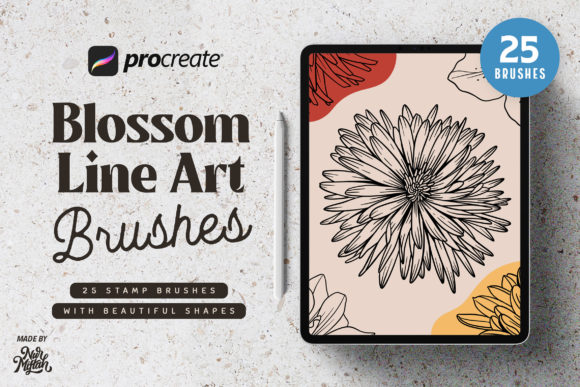
Traditional line art requires a steady hand, significant practice, and a considerable investment of time. Drawing consistent, symmetrical, or intricate floral patterns manually can be daunting, even for experienced illustrators. This is where the concept of the "stamp brush" becomes invaluable. Unlike standard brushes that lay down pigment based on pressure and tilt, stamp brushes insert pre-designed vector-like shapes onto your canvas with a single tap. The Procreate Blossom Line Art Stamp Brushes collection capitalizes on this technology, offering a curated set of 25 distinct floral shapes that maintain high-resolution clarity regardless of scaling.
The primary advantage of using stamp brushes lies in their consistency. When creating pattern designs, wallpaper, or textile prints, uniformity is often key. Manual drawing introduces natural variations, which are desirable in some contexts but problematic in others. With these blossom stamps, artists can achieve a cohesive look across an entire composition. Furthermore, because they are line art-based, they offer maximum flexibility. Users can easily recolor, resize, and manipulate the strokes to fit any color palette or design requirement, making them a versatile foundation for further customization.
Technical Compatibility and Workflow Integration
Before integrating any new tool into your digital arsenal, understanding its technical constraints is vital. These brushes are exclusively compatible with the Procreate app on iOS devices. It is important to emphasize that these brushes do not work in Adobe Photoshop, Clip Studio Paint, or other desktop-based illustration software. This limitation is due to the proprietary brush engine used by Procreate, which differs significantly from raster-based engines found in desktop applications. However, for those invested in the Apple ecosystem, this integration is seamless.
The compatibility extends across various versions of the software. Whether you are running the cutting-edge Procreate 5X with its latest feature sets or utilizing an earlier stable version, these brushes are optimized to perform without glitches. This backward compatibility is a significant benefit for users who may not update their operating systems or apps immediately, ensuring that the investment in the brush set remains viable over time. Installation is straightforward, typically involving a simple import process that adds the 25 stamp brushes directly to your existing brush library, ready for immediate use.
Diverse Applications Across Creative Industries
The utility of Procreate Blossom Line Art Brushes extends far beyond simple doodling. Their clean, crisp lines make them suitable for a wide array of professional and personal projects. Below are several key areas where these tools can make a substantial impact.
Wall Art and Home Decor Design
The market for printable wall art and digital home decor has exploded in recent years. Consumers are increasingly looking for minimalist, botanical-themed artwork that brings a sense of calm and nature into their living spaces. Using these blossom stamps, artists can rapidly compose complex floral arrangements. By layering different stamps, adjusting opacity, and varying line weights, one can create depth and texture that mimics traditional ink drawings. These designs can then be printed on canvas, framed, or sold as digital downloads, providing a scalable product line for creative entrepreneurs.
Logo Design and Branding
In the realm of branding, particularly for businesses in the wellness, beauty, and organic food sectors, floral motifs are ubiquitous. A logo needs to be distinctive yet recognizable. While custom-drawn logos are ideal, stamp brushes can serve as an excellent starting point for mood boards or initial concepts. Designers can use the 25 provided shapes to experiment with composition and balance before committing to a final, custom-vectorized design. The clean lines of the blossoms ensure that the logos remain legible even when scaled down for business cards or social media avatars.
Fashion and Textile Design
Fashion designers often require repetitive patterns for fabric prints. Manually drawing a seamless floral pattern is time-consuming and prone to errors in alignment. With Procreate’s symmetry tools combined with these blossom stamps, designers can create intricate, repeating textiles in a fraction of the time. The ability to quickly swap out flower types allows for rapid iteration, enabling designers to test multiple variations of a print before finalizing the design for production. This efficiency is crucial in the fast-paced fashion industry where trends change rapidly.
Complementing Other Design Needs
Beyond specific industries, these brushes are invaluable for general design tasks. They can be used to embellish wedding invitations, create decorative borders for newsletters, or add subtle accents to website headers. For educators and content creators, these elements can enhance visual presentations, making slides more engaging without requiring advanced graphic design skills. The versatility of line art means it can be colored to match any brand guideline or aesthetic preference, making it a universal asset for visual communication.
Maximizing Creative Potential with Customization
While the 25 stamp brushes provide a solid foundation, their true power is unlocked through customization. Procreate offers a robust suite of adjustment tools that allow users to modify the stamped images extensively. Artists can use the Gaussian Blur tool to soften edges for a dreamy effect, or apply noise to give the lines a textured, hand-printed feel. Color adjustments are equally powerful; by using clipping masks, users can change the hue, saturation, and brightness of individual flowers without affecting the rest of the composition.
Furthermore, combining these stamps with traditional drawing brushes can yield hybrid results that feel both organic and polished. For instance, an artist might use a blossom stamp for the main flower head but draw the stems and leaves manually to create a more dynamic, flowing composition. This hybrid approach leverages the speed of automation while retaining the human touch that often distinguishes great art from generic design. Experimenting with layer modes, such as Multiply or Overlay, can also integrate the line art more naturally into textured backgrounds, enhancing the overall visual harmony.
Considerations for Professional Use
When incorporating pre-made assets like Procreate Blossom Line Art Stamp Brushes into commercial work, it is essential to consider licensing and originality. While these tools accelerate the design process, relying solely on out-of-the-box stamps can result in designs that look similar to others using the same pack. To maintain a unique brand identity, professionals should use these brushes as components rather than final products. Modifying the shapes, combining them with original elements, and applying unique styling ensures that the final output remains distinct and proprietary.
Additionally, understanding the resolution limits of digital brushes is important. While Procreate handles large canvases well, excessive scaling of stamp brushes can sometimes lead to pixelation if the canvas resolution is too low. Always start with a high-resolution canvas, especially if the final output is intended for print. This ensures that the crisp lines of the blossoms remain sharp and professional, regardless of the final size.
Conclusion: Enhancing Your Digital Toolkit
The integration of Procreate Blossom Line Art Brushes into your digital workflow represents a strategic move towards greater efficiency and creative freedom. By offloading the repetitive task of drawing intricate floral details, artists and designers can focus on composition, color theory, and conceptual development. Whether you are creating wall art, designing logos, or developing textile patterns, these 25 stamp brushes offer a reliable, high-quality solution that adapts to various creative needs.
As with any tool, mastery comes from experimentation. Take the time to explore how these stamps interact with other Procreate features, such as symmetry guides, layer masks, and adjustment filters. The more you engage with the tool, the more you will discover its potential to streamline your process and enhance your artistic voice. For those seeking to expand their capabilities within the iOS ecosystem, these brushes provide a compelling blend of convenience and quality. If you have specific questions regarding installation or usage, reaching out to the creator can provide additional clarity, ensuring you get the most out of your purchase. Enjoy the process of creation, and let these blossoms bring new life to your digital canvas.