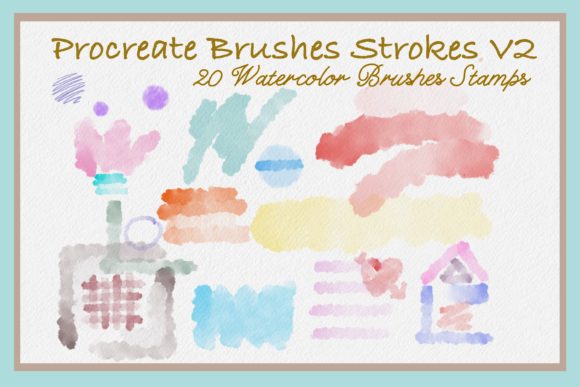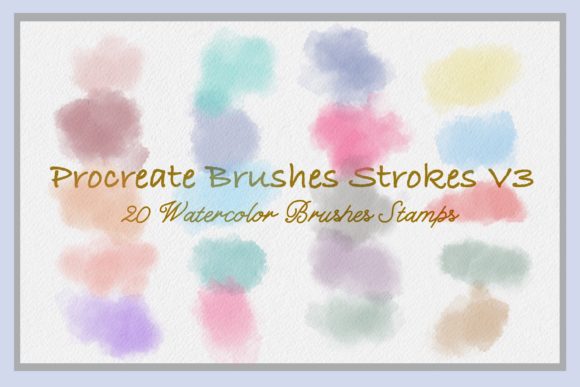
Procreate Brushes Strokes V3: Elevating Digital Art with 20 Watercolor Stamps
In the rapidly evolving world of digital illustration, efficiency often battles with authenticity. Artists and designers constantly seek tools that bridge the gap between the organic feel of traditional media and the flexibility of digital workflows. Procreate Brushes Strokes V3 emerges as a compelling solution in this space, offering a curated collection of twenty distinct watercolor brush stamps designed specifically for the iPad ecosystem. This toolset is not merely about adding texture; it is about streamlining the creative process for professionals and hobbyists alike who need high-quality, repeatable elements without sacrificing the hand-painted aesthetic.
The core appeal of this brush set lies in its versatility. Unlike standard brushes that require manual stroke execution for every detail, stamp brushes allow users to place pre-designed elements with a single tap. This functionality transforms how creators approach projects ranging from intricate surface patterns to quick social media graphics. By integrating these twenty individual stamps into your Procreate library, you gain immediate access to a library of watercolor textures that can be scaled, rotated, and recolored to fit any composition.
Transforming Graphic Design and Branding Workflows
For graphic designers, time is arguably the most valuable resource. Creating custom watercolor elements from scratch for every client project can be prohibitively time-consuming. Procreate Brushes Strokes V3 addresses this bottleneck by providing a foundational library of assets that can be customized on the fly. Consider the creation of business cards or packaging designs. A designer can quickly layer these watercolor stamps to create unique backgrounds or accent pieces that add a touch of elegance and warmth to a brand’s visual identity.
The ability to adjust opacity and color settings means that a single stamp can serve multiple purposes within a single project. A soft, translucent application might serve as a subtle background texture for a wedding invitation suite, while a more saturated, opaque version could act as a bold graphical element on a product label. This adaptability ensures that the brushes do not feel repetitive, even when used across various deliverables. Furthermore, because these are digital assets, they can be easily archived and reused, building a consistent visual language for brands that value organic, handcrafted aesthetics.
Empowering Social Media Content Creators
The demand for fresh, engaging visual content on platforms like Instagram and Pinterest is relentless. Content creators often struggle to maintain a cohesive aesthetic while producing daily posts. Here, the utility of Procreate Brushes Strokes V3 becomes evident. These watercolor stamps are ideal for creating eye-catching blog buttons, story highlights, and post overlays that stand out in a crowded feed.
Imagine a lifestyle blogger wanting to announce a new series. Instead of relying on generic stock photos, they can use these stamps to create a custom header image. The watercolor texture adds a personal, artisanal touch that resonates with audiences seeking authenticity. Similarly, influencers can use these brushes to annotate photos, adding artistic flair to product reviews or travel diaries. The ease of tapping and placing these elements allows for rapid iteration, enabling creators to experiment with different layouts and compositions without getting bogged down in technical drawing skills.
Enhancing Stationery and Printable Products
The market for digital and printable stationery is booming, driven by individuals seeking personalized items for weddings, parties, and home organization. For sellers on platforms like Etsy or independent designers, Procreate Brushes Strokes V3 offers a significant competitive advantage. The twenty included stamps provide a diverse range of shapes and textures that can be combined to create complex designs for greeting cards, planners, and wall art.
One practical application is in the creation of seamless surface patterns. By strategically placing and rotating these watercolor stamps, designers can generate repeating patterns for fabric prints, wallpaper, or wrapping paper. The digital nature of the brushes allows for precise alignment and spacing, which is difficult to achieve with traditional paint. Additionally, the high resolution of Procreate files ensures that these designs remain crisp and clear when printed, whether on small stickers or large-format posters. This capability opens up new revenue streams for artists who can sell both the digital files and physical printed products derived from them.
Ideal for Illustrators and Doodle Enthusiasts
Illustrators often use stamp brushes to add depth and interest to their characters and scenes. Rather than painting every leaf or flower petal manually, an illustrator can use these watercolor stamps to populate backgrounds or add decorative borders. This technique is particularly effective in children’s book illustrations, where a soft, whimsical atmosphere is desired. The watercolor medium inherently conveys a sense of playfulness and warmth, making it a perfect match for this genre.
For those who enjoy doodling and journaling, these brushes offer a way to elevate everyday sketches. Adding a watercolor wash or a textured stamp to a bullet journal spread can transform a simple note-taking session into a creative outlet. The immediacy of the stamp function encourages experimentation, allowing users to try out different combinations of colors and shapes without the fear of making irreversible mistakes. This low-stakes environment fosters creativity and helps users develop their unique artistic style.
Technical Considerations and Best Practices
While Procreate Brushes Strokes V3 is designed for ease of use, understanding its technical limitations and best practices is crucial for optimal results. First and foremost, these brushes are compatible exclusively with Procreate on the iPad. Users must ensure they have the latest version of the app to avoid compatibility issues. The installation process is straightforward: download the brush set file, unzip it if necessary, and import it directly into Procreate. If automatic import fails, users can manually share the file from their iPad’s folder system into the Procreate app.
Once installed, the true power of these brushes lies in customization. Users should experiment with the size, opacity, and color settings to achieve the desired effect. It is important to note that while stamps are convenient, they should not replace fundamental drawing skills entirely. Combining stamped elements with hand-drawn lines and textures creates a more dynamic and authentic final piece. Over-reliance on stamps can lead to designs that feel generic or disjointed if not integrated thoughtfully into the overall composition.
Another consideration is the resolution of the final output. For print projects, ensure that your canvas size and DPI settings are appropriate for high-quality printing. While Procreate handles large files well, excessive use of high-resolution stamps can impact performance on older iPad models. Managing layers effectively and merging them when possible can help maintain a smooth workflow.
Why Choose Procreate Brushes Strokes V3?
In a market saturated with digital brushes, Procreate Brushes Strokes V3 distinguishes itself through its focused curation and practical application. The inclusion of twenty unique watercolor stamps provides enough variety to keep projects interesting without overwhelming the user with unnecessary options. The emphasis on usability—tap, scale, and customize—makes it accessible to beginners while still offering enough flexibility for advanced users.
Ultimately, this brush set is more than just a tool; it is a catalyst for creativity. Whether you are a graphic designer looking to streamline your workflow, a content creator aiming to enhance your visual presence, or an illustrator seeking to add texture to your work, these brushes offer a versatile and efficient solution. By integrating Procreate Brushes Strokes V3 into your digital toolkit, you unlock new possibilities for expression and efficiency, allowing you to focus less on technical hurdles and more on the art of creation.