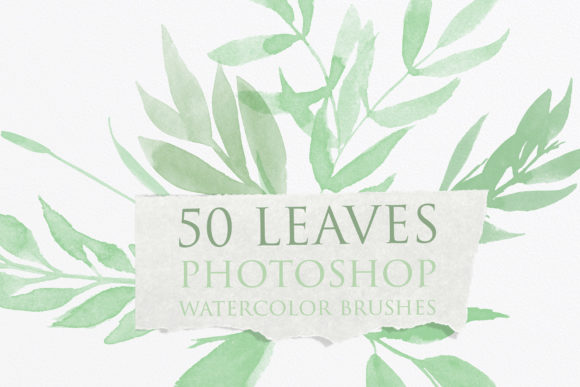
Bringing Organic Elegance to Digital Designs with Leaves Photoshop Watercolor Brushes
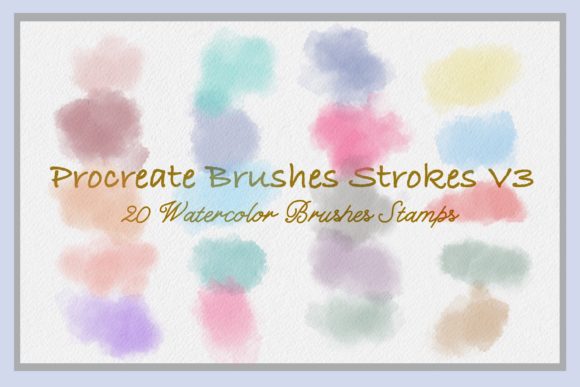
There is a distinct difference between digital art that feels sterile and designs that breathe with life. Often, that missing element is texture—the subtle imperfections of paper grain, the bleed of pigment, and the organic irregularity of nature. For designers, bloggers, and small business owners, achieving this look without spending hours painting by hand can feel like an impossible task. This is where Leaves Photoshop Watercolor Brushes become an invaluable asset in your creative toolkit. These are not just generic shapes; they are high-quality, scanned stamps derived from actual watercolor paintings, offering a bridge between traditional media and modern digital efficiency.
Why Authentic Texture Matters in Modern Design
In an era dominated by sleek, flat vector graphics and AI-generated imagery, audiences are increasingly drawn to content that feels human and tactile. Whether you are designing a wedding invitation or curating an Instagram feed, the goal is often to evoke emotion. Watercolor, with its soft edges and translucent layers, naturally conveys warmth, nostalgia, and elegance. However, mastering watercolor techniques digitally requires significant skill and time. By using pre-made watercolor leaf stamps, you bypass the learning curve while retaining the artistic integrity of hand-painted elements. The key lies in the source material: because these brushes were drawn in watercolor and scanned in high quality, they retain the nuanced variations in opacity and color saturation that synthetic brushes often lack.
Real-World Applications for Creators and Entrepreneurs
The versatility of this brush set extends far beyond simple decoration. Understanding where and how to apply these elements can transform various projects from mundane to memorable. Here is how different users can leverage these tools in their daily workflows.
Elevating Brand Identity and Logos
For small business owners, particularly those in the wellness, beauty, or artisanal food sectors, branding needs to communicate trust and natural quality. A logo for an organic skincare line or a boutique tea shop benefits immensely from botanical accents. Instead of relying on clip-art leaves that look identical across thousands of websites, you can use these Photoshop leaf brushes to create a unique monogram or border. By adjusting the blend mode and opacity, you can integrate the leaf texture seamlessly with typography, ensuring the brand feels bespoke rather than templated.
Social Media Content That Stops the Scroll
Bloggers and social media managers face the constant pressure to produce fresh, engaging visuals daily. Creating complex compositions from scratch is unsustainable. With a set of 50 different leaf variations, you can rapidly assemble seasonal graphics. Imagine creating a "Fall Sale" announcement for Instagram. By stamping a few amber and rust-colored leaves around your text, you instantly set the mood. Because the brushes allow for color customization, you can match your brand’s specific palette perfectly. This consistency helps build visual recognition, making your feed cohesive and professional without requiring advanced design skills for every post.
Wedding Invitations and Event Stationery
The wedding industry thrives on aesthetics, and watercolor florals are a perennial favorite. However, hiring an illustrator for custom botanicals can be prohibitively expensive for couples on a budget. Freelance designers can use these high-quality scanned leaves to craft elegant save-the-dates, menu cards, and place settings. The ability to change transparency is crucial here; it allows you to layer leaves behind text without compromising readability, creating a dreamy, ethereal background effect. You can mix different leaf shapes to create lush garlands or minimalist sprigs, depending on the couple’s style preference.
Enhancing Educational and Editorial Layouts
Educators and publishers often need to make dry information more engaging. In textbooks, blogs, or newsletters, breaking up text with relevant imagery improves retention and reading flow. If you are writing an article about sustainability, gardening, or environmental science, incorporating realistic watercolor leaves adds visual interest without distracting from the content. Unlike stock photos, which can feel disjointed from the text, these brushes allow you to place elements precisely where needed, such as framing a quote or highlighting a key statistic. This approach makes educational materials feel more inviting and less corporate.
Technical Flexibility: More Than Just Stamps
One common misconception about stamp brushes is that they are rigid and unchangeable. However, the true power of this ABR file lies in its adaptability within Photoshop. Since each leaf is a high-resolution scan, it responds beautifully to standard adjustment layers and blending options. You are not stuck with the original green hues. By using hue/saturation adjustments, you can turn a spring green leaf into a deep autumn orange, a winter brown, or even a fantastical purple for creative projects.
Furthermore, experimenting with blend modes like "Multiply" or "Overlay" can help the leaves interact with background textures. If you place a leaf over a textured paper background, setting the blend mode to Multiply will allow the paper grain to show through the lighter parts of the watercolor, enhancing the illusion that the leaf was physically painted on that surface. This level of control ensures that your designs never look like simple copy-paste jobs but rather integrated compositions.
What to Consider Before You Start Creating
While these brushes are designed for ease of use, getting the best results requires a bit of strategic thinking. First, consider the resolution of your final output. If you are designing for print, such as posters or wedding invitations, ensure your Photoshop canvas is set to 300 DPI. Although the scans are high quality, stretching a small brush stroke too large can reveal pixelation. Test the size limits of your favorite leaves early in the process.
Second, think about composition balance. Watercolor elements are delicate. Overusing them can clutter a design and dilute their impact. It is often more effective to use one or two well-placed leaves as focal points rather than scattering fifty across the canvas. Use the variety in the set—50 different shapes—to create asymmetry and natural flow. Nature is rarely perfectly symmetrical, and your design shouldn’t be either.
Finally, remember that these tools are meant to save you time, not replace creativity. Use them as a foundation. Combine them with hand-drawn lines, typography, or other textures to create something unique. The goal is to enhance your message, not let the assets overpower it.
Investing in Your Creative Efficiency
For freelancers and agency owners, time is money. Spending three hours painting a single leaf is rarely billable or efficient. Investing in a reliable set of Leaves Photoshop Watercolor Brushes allows you to deliver high-end, organic-looking designs in a fraction of the time. It empowers you to say yes to projects that require a soft, natural aesthetic without fearing the technical workload. Whether you are a hobbyist looking to personalize digital journals or a marketer aiming to soften a brand’s image, these tools provide the flexibility and quality needed to succeed.
If you have questions about installation or specific use cases, reaching out to the creator can provide clarity and support. As Natalia notes, she is happy to help, ensuring that your experience with the shop is positive and productive. Thanks for visiting, and may these tools inspire your next masterpiece. Happy creating.