Creating Authentic Textures with Procreate Realistic Tie Dye Brushes Vol4
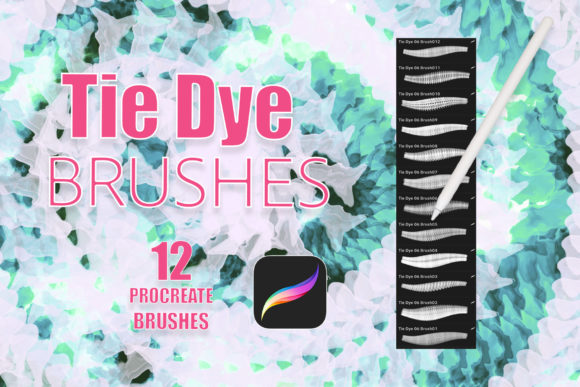
Digital art has come a long way from flat, vector-style illustrations. Today, audiences crave texture, depth, and the organic imperfections that make handcrafted work feel alive. For iPad artists, achieving that specific, chaotic beauty of tie-dye without the mess of real dye and fabric can be a challenge. This is where specialized tools like Procreate Realistic Tie Dye Brushes Vol4 change the workflow entirely. These brushes are not just stamps; they are dynamic tools designed to mimic the fluid behavior of dye spreading through fiber, offering a level of realism that standard round brushes simply cannot replicate.
If you are a creator looking to add vibrant, psychedelic, or retro-inspired elements to your digital portfolio, understanding how to leverage these assets can save you hours of manual blending. Whether you are designing for a client, creating personal art, or building a brand identity, knowing when and how to apply these textures makes the difference between a generic design and a standout piece.
Why Digital Tie-Dye Requires Specialized Tools
Tie-dye is inherently unpredictable. It relies on the physics of liquid absorption, fabric tension, and color bleeding. Replicating this digitally using standard soft brushes often results in muddy, uniform gradients that lack the characteristic "crackle" and organic flow of real dye. Procreate Realistic Tie Dye Brushes vol 4 addresses this by embedding complex transparency and pressure-sensitive behaviors into each stroke.
The core value here is efficiency mixed with authenticity. Instead of spending twenty minutes layering multiple opacity masks and noise filters to get a single swirl to look right, you can achieve a comparable effect in seconds. The brushes come with transparent backgrounds, which is a critical feature. It means you are not painting over a white box; you are laying down pure pigment data that interacts with whatever layer sits beneath it. This allows for non-destructive editing, letting you swap out background textures or colors without losing the integrity of the dye pattern itself.
Real-World Applications for Creators and Businesses
The utility of these brushes extends far beyond simple abstract art. Because tie-dye has cycled back into mainstream fashion and design, the demand for high-quality, customizable tie-dye assets is higher than ever. Here is how different users can integrate Procreate Realistic Tie Dye Brushes Vol4 into their daily workflows.
Apparel and Merchandise Design
For small business owners selling print-on-demand t-shirts, hoodies, or tote bags, unique designs are currency. Using these brushes, you can create custom dye patterns that serve as the base for your merchandise. Since the brushes support pressure sensitivity via the Apple Pencil, you can control the intensity of the color bleed. A light touch creates a washed-out, vintage look, while heavy pressure delivers saturated, vibrant bursts. You can then overlay logos or text, creating a professional mockup that looks like a photograph of a real garment rather than a flat digital composite.
Invitations and Event Stationery
Wedding invitations, birthday cards, and festival passes often benefit from a playful, colorful aesthetic. A bohemian-themed wedding, for instance, might call for subtle watercolor-like dye effects in the background of the save-the-date cards. With Procreate Realistic Tie Dye Brushes vol 4, you can generate unique background textures for each invitation suite, ensuring no two designs are exactly alike. The ability to adjust colors means you can match the bride’s specific palette—perhaps muted sage greens and dusty pinks—rather than being stuck with primary neon colors.
Tattoo Art and Flash Sheets
Tattoo artists who specialize in new-school or watercolor styles often use tie-dye effects to create dynamic backgrounds for their flash sheets. These brushes allow artists to experiment with color combinations rapidly. An artist can sketch a central figure, such as a skull or a flower, and then use the tie-dye brushes to create a swirling, energetic aura around it. Because the brushes are realistic, the resulting digital flash sheet gives potential clients a very accurate preview of how the ink will settle and blend under the skin, helping to manage expectations and close sales.
Logo and Brand Identity Elements
While logos are typically clean and vector-based, modern branding often incorporates textured elements for social media graphics, packaging, or limited-edition campaigns. A skincare brand launching a summer line might use a subtle tie-dye wash behind their product photography to evoke feelings of fun and relaxation. Using these brushes, a graphic designer can create bespoke textures that align with the brand’s voice, avoiding the cliché look of stock photo overlays.
Technical Considerations and Setup
Before downloading and installing, it is important to understand the technical requirements to ensure a smooth experience. These files are ONLY compatible with the Procreate app. They will not work in Photoshop, Procreate Pocket, or other illustration software. This specificity ensures that the brush engine leverages Procreate’s unique rendering capabilities, but it also limits your ecosystem to Apple’s iPadOS environment.
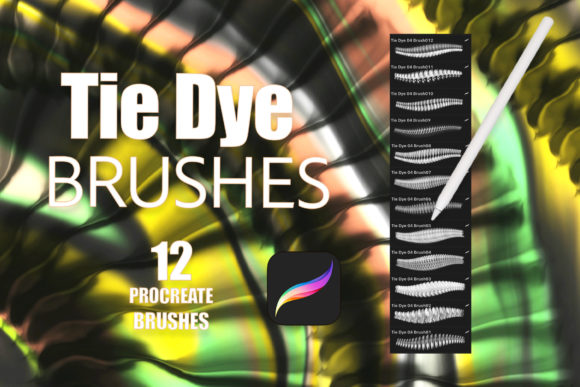
To get the most out of Procreate Realistic Tie Dye Brushes Vol4, hardware matters. You need an iPad Pro or an iPad paired with an Apple Pencil or a third-party stylus that supports pressure sensitivity. Without pressure sensitivity, you lose the ability to vary the opacity and size of the dye spread dynamically, which is essential for achieving that realistic, hand-painted look. The set includes 12 distinct brushes in a single .brushset file, packaged in a zip archive. Once unzipped and imported into Procreate, they appear as a new brush group, ready for immediate use.
Maximizing the Potential of the Brush Set
Owning the brushes is only the first step; mastering them requires experimentation. Because the backgrounds are transparent, you have total freedom to layer. Try placing a texture layer—such as paper grain or fabric weave—beneath your dye layer. Multiply the blending mode of the dye layer to let the texture show through the color. This technique adds a tactile quality that makes digital art feel physical.
Color theory plays a huge role here. Tie-dye works best when contrasting colors are used, but analogous colors create a more soothing, watercolor effect. Use the color picker in Procreate to sample colors from reference images if you are aiming for a specific mood. Remember that these brushes are tools, not magic wands. The best results come from combining the brush strokes with manual adjustments, such as using the smudge tool to soften edges or the eraser to create negative space.
Who Should Invest in This Tool?
This brush set is ideal for illustrators who want to expand their textural vocabulary without learning complex photo-manipulation techniques. It is particularly useful for freelancers who need to deliver high-volume, high-quality assets quickly. Educators teaching digital art can also use these brushes to demonstrate concepts of layering, transparency, and color mixing in a fun, engaging way.
However, if you strictly work in vector graphics or prefer minimalist, flat design aesthetics, these brushes may not see frequent use. They are specialized tools for a specific visual language. If your work involves organic shapes, fluid dynamics, or retro-inspired visuals, Procreate Realistic Tie Dye Brushes vol 4 is a worthwhile addition to your library.
In conclusion, integrating Procreate Realistic Tie Dye Brushes Vol4 into your creative process allows you to bridge the gap between digital precision and analog chaos. By understanding the technical requirements and exploring diverse applications—from tattoo flash to boutique branding—you can unlock new creative possibilities. The key is to experiment with layers, pressure, and color combinations to find the unique signature style that sets your work apart.