Procreate Liquid Brushes: Mastering Realistic Fluid Effects in Digital Art
Digital illustration has evolved far beyond simple line work and flat colors. Today, audiences expect depth, texture, and organic movement in visual assets. This is where specialized tools like Procreate Liquid Brushes become indispensable for creators who want to elevate their workflow. Whether you are designing a movie poster, crafting social media assets, or illustrating a book cover, the ability to simulate realistic fluids can transform a good design into a captivating one.
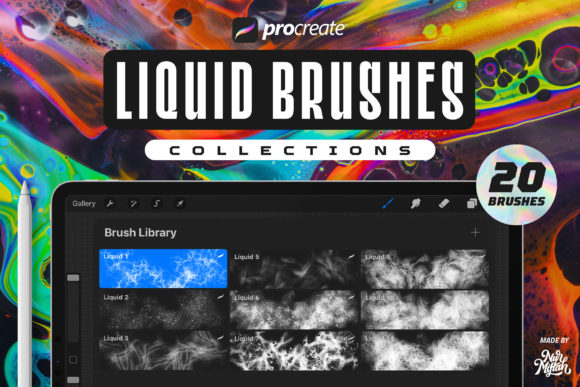
However, many artists stumble when integrating these advanced brushes into their toolkit. The allure of instant realism often leads to overlooked technical details and compatibility issues. By understanding the nuances of these tools—specifically sets like the "20 Procreate Liquid Brushes" crafted from real space objects—you can avoid common pitfalls and ensure your digital creations maintain high image quality and professional polish.
Understanding the Unique Value of Space-Inspired Liquid Textures
Not all liquid brushes are created equal. Standard watercolor or ink brushes mimic traditional media, but liquid brushes designed with unique source materials offer something different. The specific set introduced here is distinct because it is made from a combination of real space objects. This unusual origin story isn’t just marketing fluff; it translates directly to the visual output. These brushes contain complex, irregular shapes in every stroke, providing a level of organic randomness that is difficult to achieve manually.
When you apply these strokes, you aren't just painting a color; you are layering intricate textures that mimic the chaotic beauty of cosmic fluids or nebulous gases. This makes them particularly effective for creating backgrounds that need to feel vast and dynamic. For designers working on sci-fi themes, abstract posters, or modern book covers, this inherent complexity saves hours of manual texturing.
Common Mistakes When Using Liquid Brushes in Procreate
Even experienced illustrators can misuse specialized brushes. Here are the most frequent errors that compromise the quality of your final artwork, along with practical advice on how to correct them.
Ignoring Background Contrast
One of the most significant misunderstandings involves the canvas background. Many artists default to a white canvas, assuming it is the neutral standard for all digital art. However, these specific liquid brushes are optimized for dark environments. The documentation explicitly states that the effect will look more real if you use a black background.
Why this matters: On a white background, the subtle gradients and translucent layers of the liquid effect can appear washed out or muddy. The contrast provided by a black or dark-colored background allows the light-refracting qualities of the brush to pop, creating a glowing, three-dimensional appearance.
The Fix: Before you begin sketching, fill your background layer with black or a deep, dark hue. If your project requires a light theme, consider using the "Multiply" blend mode for the brush strokes, though this may alter the intended color vibrancy. Always test your strokes on a dark layer first to gauge the true potential of the texture.
Assuming Cross-Platform Compatibility
A critical error that leads to immediate frustration is attempting to use these brushes outside of their intended ecosystem. It is vital to remember that these brushes are exclusively for the iOS APP Procreate. They DO NOT WORK IN PHOTOSHOP or other desktop applications like Clip Studio Paint or Affinity Designer.
Why this matters: Procreate uses a proprietary brush engine (.brushset files) that is not compatible with Adobe’s .abr format or other standards. Purchasing or downloading these brushes with the expectation that they will work on your iPad and then sync to your desktop Photoshop workflow will result in unusable files. This misunderstanding wastes time and budget.
The Fix: Audit your workflow before purchasing. If you rely heavily on Photoshop for final compositing, plan to create your liquid elements in Procreate on your iPad, export them as high-resolution PNGs with transparent backgrounds, and then import those static images into Photoshop. Do not expect live brush functionality across platforms.
Overlooking Version Compatibility
Software updates can break older tools. While this set is robust, users often fail to check if their current version of Procreate supports the brush features. Fortunately, these brushes are compatible with Procreate 5X and earlier versions, but this is not always the case for all third-party assets.
Why this matters: Using outdated software might prevent certain brush dynamics, such as pressure sensitivity or tilt response, from functioning correctly. This leads to stiff, unnatural strokes that lack the "good image quality" promised by the creator.
The Fix: Ensure your Procreate app is updated to at least version 5X for optimal performance. If you are on an older iOS device that cannot support the latest Procreate updates, verify with the creator whether the brush set remains functional on your specific version.
Maximizing Versatility Across Design Projects
The utility of these brushes extends far beyond simple abstract art. Because each stroke contains many shapes, they are incredibly versatile for various commercial and creative needs. Here is how to effectively apply them across different mediums:
- Social Media Assets: Use the liquid textures to create eye-catching backgrounds for Instagram stories or TikTok covers. The organic movement draws the eye and increases engagement.
- Book and Movie Covers: The cosmic, space-derived nature of the brushes makes them ideal for science fiction or fantasy genres. Layering these strokes can create atmospheric depth behind title typography.
- Poster Design: Instead of relying on stock photos for fluid effects, generate custom liquid shapes. This ensures your design is unique and free from licensing restrictions associated with stock imagery.
- Illustrations: Incorporate the brushes for magical effects, potion spills, or futuristic energy beams within character illustrations.
Evaluating Quality Before You Commit
When selecting any digital asset, due diligence is key. The description notes that this set is "made with care," but you should verify this through practical testing. Most reputable marketplaces allow for preview images or sample downloads. Look for clarity in the stroke edges and smoothness in the gradient transitions. Poorly made brushes often pixelate when scaled up or exhibit repetitive patterns that break the illusion of randomness.
Additionally, consider the support structure. The creator invites users to contact them if you have any questions. This willingness to engage is a strong indicator of a reliable product. If you encounter installation issues or unexpected behavior, having direct access to the creator can save your project timeline.
Final Thoughts on Enhancing Your Digital Toolkit
Integrating Procreate Liquid Brushes into your workflow is less about finding a shortcut and more about expanding your artistic vocabulary. By respecting the technical constraints—such as the need for a black background and iOS exclusivity—you unlock the full potential of these tools. The result is a collection of assets that offer high image quality and genuine versatility for everything from casual hobby projects to professional commercial design.
Remember, the best tool is the one you understand deeply. Take the time to experiment with the shapes in every stroke, adjust your canvas settings, and respect the platform limitations. When used correctly, these brushes do not just add color; they add life, depth, and a touch of cosmic realism to your digital canvas. Enjoy the process, and let the unique textures inspire your next creative breakthrough.