Creating Spooky Digital Art with Grunge Halloween Brushes
Halloween is one of those rare holidays where creativity isn't just encouraged; it is practically demanded. Whether you are a graphic designer working on seasonal campaigns, a small business owner updating your storefront, or a parent looking to add a personal touch to your child’s bedroom decor, the pressure to produce something unique can be intense. This is where digital tools like Grunge Halloween Brushes come into play. Rather than starting from scratch or relying on overused stock imagery, these brushes offer a shortcut to professional-looking, textured results that feel authentic and hand-crafted.
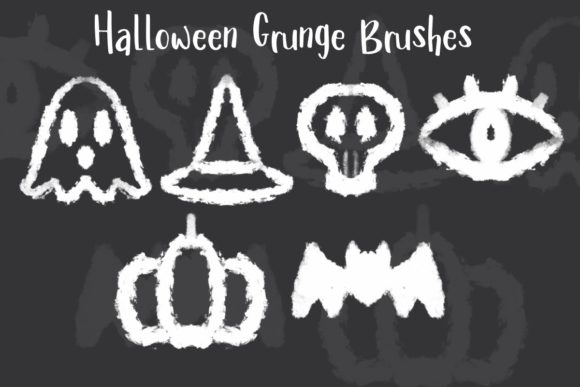
This creative collection consists of six specialized Procreate brushes, each designed to capture the gritty, eerie essence of the season. The set includes distinct stamps for a ghost, a witch’s hat, a Halloween skull, an eye, a pumpkin, and a bat. While the list might seem simple, the utility lies in the "grunge" aesthetic. Clean, vector-style icons often feel sterile and corporate. In contrast, grunge textures add depth, history, and a tactile quality that resonates more deeply with viewers. These brushes are compatible exclusively with Procreate on iOS and iPadOS, making them an ideal tool for artists who prefer working on tablets for their portability and intuitive interface.
Why Texture Matters in Seasonal Design
When we think about Halloween, we do not think about perfection. We think about decay, mystery, and the uncanny. A perfectly smooth pumpkin illustration looks like a cartoon; a pumpkin with rough edges, uneven ink distribution, and textured shading looks like something pulled from an old storybook or printed on a vintage poster. This distinction is crucial for creators aiming to evoke emotion.
Using Grunge Halloween Brushes allows you to bypass the tedious process of manually adding noise, distressing layers, or hunting for overlay textures. The brush engine in Procreate handles the randomness of the grunge effect, ensuring that no two stamps look exactly alike. This variability is key to maintaining a natural feel in your artwork. For marketers and bloggers, this means your social media posts stand out in a feed saturated with polished, generic graphics. For educators, it means creating handouts that engage students visually without appearing mass-produced.
Practical Applications for Small Business Owners
For entrepreneurs and small business owners, Halloween represents a significant revenue opportunity. From retail shops to cafes, everyone wants to participate in the seasonal hype. However, hiring a professional illustrator for every seasonal update is rarely budget-friendly. This is where these brushes provide immense value.
Consider a local coffee shop launching a "Witch’s Brew" special. Instead of using a standard clip-art pumpkin on their chalkboard menu or Instagram stories, the owner can use the pumpkin and witch’s hat brushes to create a custom, branded graphic. The grunge texture aligns well with the rustic, artisanal vibe many independent cafes cultivate. Similarly, a boutique clothing store could use the bat and skull brushes to design limited-edition t-shirt mockups. By layering these elements with their logo, they create a cohesive look that feels exclusive rather than templated.
The versatility extends to packaging as well. If you sell handmade soaps, candles, or treats, adding a stamped ghost or eye design to your labels can elevate the perceived value of the product. It suggests care and attention to detail. Since the files are digital, you can iterate quickly, testing different color combinations and layouts until you find the perfect fit for your brand identity.
Enhancing Personal Projects and Home Decor
Beyond commercial use, these brushes are fantastic for personal creative projects. Many adults enjoy DIY home decor, and Halloween offers a chance to transform living spaces. If you have a Cricut or Silhouette machine, you can create designs in Procreate using the Grunge Halloween Brushes, export them, and cut them out for window decals, wall art, or throw pillow covers.
Parents, in particular, will find the kid-friendly yet spooky elements useful. The ghost and pumpkin designs are playful enough for a child’s room but stylish enough to avoid looking childish. You might create a custom bedtime story illustration featuring the witch’s hat and bat, printing it out to frame above a bed. This personal touch creates memories and makes the holiday feel more magical for children. Furthermore, because the brushes are easy to use, you can involve older kids in the design process, teaching them basic digital art skills while creating family decorations together.
Content Creation and Social Media Engagement
In the digital age, content is king, and seasonal content drives engagement. Bloggers, influencers, and social media managers are constantly searching for ways to refresh their feeds. Standard Halloween fonts and colors are everywhere, but custom illustrations stop the scroll. Using the eye or skull brush as a focal point in a thumbnail can increase click-through rates by adding an element of intrigue.
For example, a lifestyle blogger writing about "Spooky Self-Care" could use the grunge eye brush to create a mysterious, artistic header image. A fitness influencer promoting a "Hell-raiser" workout challenge might use the skull and bat elements to design energetic, edgy promotional graphics. The key advantage here is speed. You do not need to be a master illustrator to produce high-quality assets. With a few taps and strokes, you have a unique visual asset that belongs entirely to you, avoiding copyright issues associated with free stock photos.
Technical Considerations and Best Practices
Before downloading and using Grunge Halloween Brushes, it is important to understand the technical requirements and how to get the best results. First and foremost, these are Procreate brushes. You must have an iPad running iOS or iPadOS with the Procreate app installed. They will not work in Photoshop, Illustrator, or other desktop-based software unless you export the resulting artwork as an image file after creation.
When using grunge brushes, layer management is essential. Because these brushes rely on texture and opacity variations, they often look best when layered. Try stamping a pumpkin in a dark orange, then lowering the opacity and stamping it again slightly off-center in a lighter shade. This creates a worn, vintage print effect. Experiment with blending modes such as "Multiply" or "Overlay" to integrate the brushes seamlessly with background textures like paper, fabric, or concrete.
Color choice also plays a pivotal role. While traditional orange and black are staples, do not be afraid to deviate. The grunge aesthetic works beautifully with muted palettes—think sage green, dusty purple, or charcoal gray. The skull brush, for instance, looks striking in a pale bone white against a dark, moody background. The eye brush can be rendered in unnatural colors like neon green or deep violet for a supernatural effect.
Maximizing Value Through Versatility
The true value of this six-brush set lies in its adaptability. It is not just for October 31st. The grunge style lends itself to gothic, punk, or alternative aesthetics that can be used year-round depending on the context. The bat and skull motifs, for example, are relevant for horror-themed projects, music album covers, or tattoo design references at any time of year.
However, for immediate seasonal impact, plan your usage ahead. Start creating assets in early September to build anticipation. Use the witch’s hat for back-to-school meets fall transitions. Deploy the ghost and pumpkin designs for mid-October engagement peaks. Save the darker, grittier skull and eye designs for late-night events or horror-centric content closer to the holiday.
Ultimately, Grunge Halloween Brushes serve as a bridge between idea and execution. They remove the technical barrier of creating complex textures while providing the artistic freedom to customize every detail. Whether you are designing a t-shirt line, decorating your home, or boosting your social media presence, these tools empower you to create work that feels personal, professional, and perfectly spooky. By integrating these brushes into your workflow, you save time, enhance visual appeal, and connect more authentically with your audience through the power of textured, hand-crafted digital art.