Exploring the Hello Collection: A Practical Look at 44 Procreate Chalk Brushes
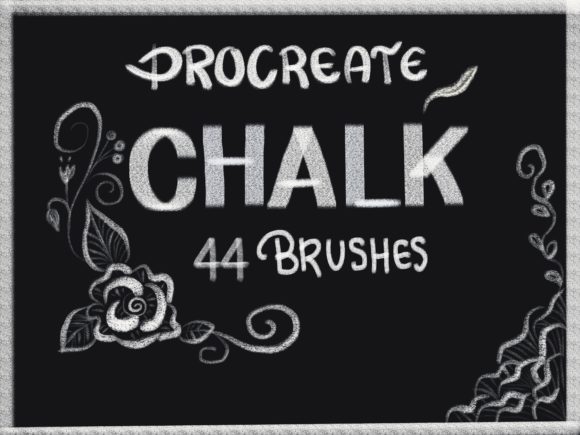
Digital illustration has evolved significantly over the last decade, moving from rigid vector lines to textured, organic simulations that closely mimic traditional media. For artists working within the iPad ecosystem, Procreate remains the industry standard, largely due to its robust brush engine and community-driven marketplace. Among the vast array of available assets, texture-based tools hold a specific appeal for those seeking warmth and tactile realism in their work. The Hello collection, featuring 44 specialized chalk brushes, represents a focused resource for creators aiming to integrate dry media aesthetics into their digital workflow.
This analysis examines the utility, compatibility, and practical application of these brushes, offering an objective perspective for professionals, educators, and serious hobbyists considering this addition to their library.
The Value of Digital Chalk in a Modern Workflow
Chalk, pastel, and charcoal are mediums defined by their grain, opacity, and interaction with paper texture. Replicating these qualities digitally requires more than just a soft edge; it demands complex noise patterns, pressure sensitivity mapping, and tilt recognition. The primary strength of the Procreate Chalk Brushes found in the Hello collection lies in their ability to simulate this physical resistance.
For graphic designers and illustrators, the shift from clean digital vectors to textured strokes can add a layer of authenticity to commercial projects. Whether creating editorial illustrations, storyboards, or concept art, the imperfect nature of chalk allows for quicker ideation and a more human feel. This set of 44 brushes provides a diverse range of these textures, eliminating the need for artists to spend hours customizing single brushes to achieve the desired grit or spread.
Key Characteristics and Versatility
The collection includes 44 distinct brushes, a number that suggests significant variety rather than mere redundancy. In practical terms, this diversity allows users to switch between broad coverage tools for blocking in colors and finer, sharper tips for detailing. The brushes are designed to respond to the Apple Pencil’s pressure and tilt sensors, which is critical for achieving natural-looking transitions.
Versatility is a central theme here. These tools are not limited to one style of art. They can be effective for:
- Concept Art: Rapidly sketching environments with atmospheric depth.
- Typography: Creating hand-lettered headers with a rustic or vintage appeal.
- Educational Content: Educators and bloggers can use these brushes to create engaging, hand-drawn diagrams that feel approachable and less sterile than standard digital fonts.
- Texture Overlay: Marketers and social media managers can apply subtle chalk textures to backgrounds to break up flat color fields in promotional graphics.
Compatibility and Technical Requirements
Before purchasing any digital asset, understanding technical constraints is essential for a smooth user experience. These brushes are developed specifically for the Procreate app on iPad. It is important to note that they are not compatible with Procreate Pocket (iPhone version) in the same capacity, nor do they work with desktop software like Photoshop or Clip Studio Paint without significant conversion efforts.
Furthermore, the effectiveness of these brushes relies heavily on hardware. To fully utilize the pressure sensitivity and tilt features embedded in the brush settings, users need an iPad paired with an Apple Pencil or a third-party stylus that supports pressure data. Using a capacitive stylus without pressure sensitivity will result in uniform strokes, stripping away the dynamic range that makes chalk simulation convincing. Therefore, this product is best suited for users who already possess the necessary hardware infrastructure.
Installation and Usability
The ease of integration into an existing workflow is a major factor in the long-term value of digital brushes. The process for installing the Hello collection is straightforward, minimizing friction for new users:
- Purchase and Confirmation: After completing the transaction, users receive an automated email containing a secure download link. This immediate delivery system ensures that creative momentum is not lost waiting for physical shipping.
- File Download: The files are typically packaged in a compressed format (such as .zip) or as direct .brushset files. Users must download these to their iPad’s Files app or a cloud storage service accessible from the iPad.
- Importing to Procreate: Within the Procreate app, users tap on the brush library, select "Import," and navigate to the downloaded file. The app automatically installs the 44 brushes into a new or existing folder, making them immediately available for use.
This streamlined process reflects professional standards in digital asset distribution, respecting the user’s time and technical proficiency levels.
Performance in Real-World Scenarios
When evaluating the Procreate Chalk Brushes from Infinity Art Works, one must consider how they perform under actual working conditions. Digital brushes often look impressive in static preview images but can feel sluggish or unresponsive during rapid sketching.
Based on the design principles of high-quality Procreate brushes, this collection likely prioritizes performance optimization. Heavy texture brushes can sometimes lag on older iPad models if the grain resolution is too high. However, a well-curated set balances visual fidelity with processing efficiency. For professionals working on tight deadlines, such as freelancers or agency designers, this reliability is crucial. The ability to lay down consistent strokes without unexpected jumps or latency issues ensures that the tool serves the artist, rather than hindering them.
Moreover, the consistency of the texture across different stroke speeds is a key indicator of quality. Lower-quality brushes often lose their texture when moved quickly, turning into solid blocks of color. A superior chalk brush maintains its granular appearance regardless of velocity, allowing for expressive, gestural marks that retain their character.
Who Benefits Most from This Collection?
While any digital artist might find value in additional brushes, certain groups will derive more practical benefit from this specific set:
- Illustrators and Concept Artists: Those who need to iterate quickly on ideas benefit from the organic feel that encourages loose, exploratory drawing.
- Educators and Coaches: Creating visual aids that mimic a classroom whiteboard or chalkboard can enhance student engagement. The authentic look helps bridge the gap between digital convenience and traditional familiarity.
- Small Business Owners and Marketers: Brands aiming for an artisanal, handmade, or eco-friendly aesthetic can use these brushes to design packaging mockups, social media posts, and website elements that stand out against polished corporate graphics.
- Hobbyists: For those transitioning from traditional media to digital, these brushes provide a comfortable middle ground, reducing the learning curve associated with purely digital tools.
Limitations and Considerations
It is equally important to address potential limitations. First, these are digital-only tools. Users expecting physical chalk or printable templates will be disappointed. Second, the aesthetic is specific. If a project requires clean, corporate minimalism or hyper-realistic 3D rendering, chalk brushes may not align with the visual goals. They are stylistic tools, best used when a textured, hand-crafted look is desired.
Additionally, while 44 brushes offer variety, they may overlap in function. Experienced users might find they gravitate toward five or six favorites, leaving the rest unused. This is common in large brush sets, but it underscores the importance of organizing the library effectively within Procreate to maintain a clutter-free workspace.
Final Thoughts on Long-Term Value
The Hello collection from Infinity Art Works offers a substantial toolkit for artists seeking to incorporate chalk textures into their digital repertoire. With 44 specialized brushes, it provides enough variety to handle everything from broad background washes to fine detailed work. The emphasis on compatibility with the Apple Pencil ensures that users with the right hardware can leverage full pressure and tilt capabilities for a natural drawing experience.
For professionals and creators who value efficiency and authenticity, this set represents a practical investment. It removes the technical barrier of creating custom textures from scratch, allowing artists to focus on composition and creativity. While it serves a specific aesthetic niche, within that niche, it delivers reliable, high-quality results. As with any digital tool, its true value is realized through consistent use and integration into a personalized workflow. For those ready to expand their textural options in Procreate, this collection warrants serious consideration.
Thank you for shopping with Infinity Art Works. Have a nice day.