80 Botanical Stamp Brushes for Procreate: A Practical Guide
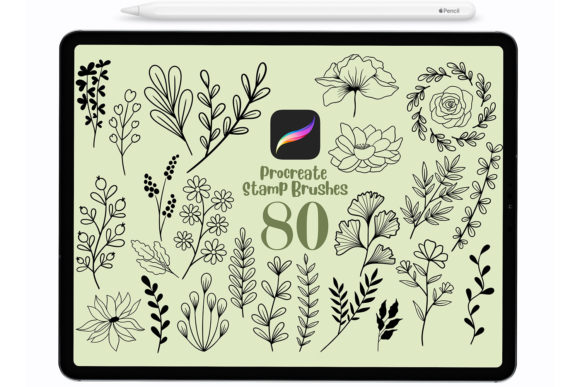
Digital illustration has transformed the way artists approach botanical art, offering tools that bridge the gap between traditional hand-drawn aesthetics and modern digital efficiency. Among the many resources available to iPad users, the 80 Botanical Stamp Brushes for Procreate stand out as a specialized toolset designed for creators who value speed without sacrificing organic detail. This collection features a set of 80 hand-drawn floral brushes, curated specifically for making botanical illustrations, prints, stickers, wallpapers, and various other design projects. Understanding how these stamps function, their technical limitations, and their ideal use cases is essential for determining whether they align with your creative workflow.
Understanding the Toolset
At its core, this product is a library of pre-rendered digital stamps rather than dynamic painting brushes. Each of the 80 elements represents a distinct floral or botanical component, such as leaves, petals, stems, or complete flower heads. Because they are hand-drawn, they retain the irregularities and textures characteristic of traditional ink or pencil work. This distinguishes them from vector-based clip art or overly polished digital assets, providing a more authentic, artisanal feel to digital compositions.
The primary function of these stamps is to accelerate the illustration process. Instead of drawing every leaf or petal from scratch, users can place pre-made elements onto their canvas. This allows for rapid composition building, making it easier to experiment with layout and density before committing to final details. For designers creating pattern repeats for wallpaper or fabric, this capability significantly reduces production time.
Key Features and Technical Specifications
When evaluating digital assets, compatibility and ease of use are paramount. These Procreate stamps are compatible with Procreate version 4.1 and above, ensuring they work on a wide range of iPad models that support the app. One of the most notable features of this specific brush set is its accessibility regarding input methods. Unlike many advanced Procreate brushes that rely heavily on tilt and pressure data to create variation, these stamps are not pressure sensitive.
This lack of pressure sensitivity is a deliberate design choice that offers significant flexibility. Users can create consistent shapes regardless of how hard they press on the screen. Consequently, these brushes can be used effectively with third-party styluses, the Apple Pencil, or even a finger. This makes the set particularly useful for artists who do not own an Apple Pencil or those who prefer a more casual, touch-based interaction style.
Customization remains robust despite the fixed shape of the stamps. Users can change the color, size, and opacity of each stamp independently. This allows for layering effects, where semi-transparent overlays can create depth, or color adjustments can match a specific brand palette or artistic theme. The ability to resize elements instantly means that a single small flower stamp can be scaled up to become a focal point or shrunk down to serve as background texture.
Benefits for Digital Creators
The primary benefit of using the 80 Botanical Stamp Brushes for Procreate is efficiency. For commercial artists working on tight deadlines, such as those designing greeting cards, social media content, or print-on-demand products, the ability to drag and drop high-quality botanical elements is invaluable. It removes the repetitive strain of drawing similar organic shapes multiple times, allowing the artist to focus on composition and color theory.
Furthermore, the hand-drawn nature of the brushes ensures that the resulting artwork does not look mechanically generated. In an era where AI-generated images are becoming common, maintaining a human touch in design is increasingly valued by clients and audiences. These stamps provide a shortcut to that handmade aesthetic without requiring hours of manual sketching.
Versatility is another strong point. The set is suitable for a wide range of applications beyond simple illustration. They are effective for creating digital stickers, where clean, isolated elements are necessary. They also work well for wallpaper designs, where repeating patterns need to feel natural rather than rigid. The non-pressure-sensitive nature ensures that the output is predictable, which is crucial when creating seamless patterns or uniform design elements.
Considerations and Tradeoffs
While the convenience of stamp brushes is clear, there are tradeoffs to consider. Because these are stamps and not dynamic brushes, they do not respond to the nuance of hand movement in the same way a standard ink or watercolor brush would. Artists who prioritize the expressive quality of line weight variation based on pressure may find these tools limiting for primary sketching or detailed rendering. They are best used as building blocks rather than as a complete replacement for freehand drawing skills.
Additionally, since the shapes are pre-defined, there is a risk of repetition if the same stamps are used excessively without modification. To maintain visual interest, users must actively vary the rotation, scale, opacity, and color of the stamps. Relying too heavily on the default settings can result in artwork that looks generic or templated. Successful use of this set requires a thoughtful approach to arrangement and layering.
Another consideration is the learning curve associated with importing and managing brush sets. While the process is straightforward, new users may need guidance. To import the files after downloading, users must go to their Files app, locate the downloaded file, and double-tap or right-click on it. This action will automatically import the brushes into Procreate. Ensuring that the file is stored in an accessible location on the iPad is crucial for a smooth setup experience.
Ideal Use Cases
This toolset is a strong fit for several specific scenarios:
- Pattern Design: Creating seamless backgrounds for textiles, wrapping paper, or digital wallpapers where repeated floral motifs are required.
- Commercial Illustration: Producing assets for stickers, invitations, and greeting cards where quick turnaround times are essential.
- Beginner Digital Artists: Individuals who are new to Procreate and may struggle with controlling pressure sensitivity or drawing complex botanical structures from scratch.
- Non-Apple Pencil Users: Artists using capacitive styluses or their fingers who need tools that do not rely on advanced hardware features.
When to Consider Alternatives
There are situations where alternative tools may be more appropriate. If your goal is to create highly realistic, painterly botanical studies that require nuanced blending and texture variation, traditional painting brushes with full pressure and tilt sensitivity would be a better choice. Similarly, if you need precise geometric control or scalable vectors for large-format printing, vector-based software like Adobe Illustrator might be more suitable than raster-based Procreate stamps.
Artists who enjoy the meditative process of drawing every line manually may also find that stamp brushes reduce the satisfaction derived from the creative process. For these individuals, reference libraries or photo textures might serve as inspiration without replacing the act of drawing itself.
Making the Decision
Deciding whether to incorporate the 80 Botanical Stamp Brushes for Procreate into your workflow depends on your specific goals. If you value speed, consistency, and a hand-drawn aesthetic, this set offers a practical solution. It lowers the barrier to entry for creating complex botanical compositions and supports a variety of input devices, making it accessible to a broad audience.
However, it is important to view these stamps as components of a larger toolkit rather than a standalone solution. Combining them with custom drawing, texturing, and color adjustment techniques will yield the best results. By understanding both the capabilities and the limitations of these stamps, you can make an informed decision about whether they align with your artistic needs and project requirements.