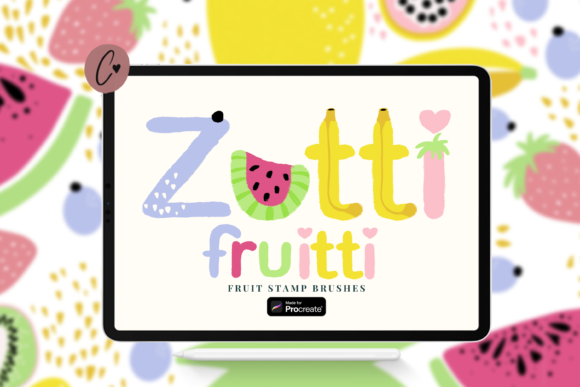
Zutti Fruitti Procreate Stamp Brushes Guide
In the fast-paced world of digital illustration, efficiency often dictates the quality and volume of work a creator can produce. Whether you are designing packaging for a local jam brand, creating vibrant social media graphics, or illustrating a children’s book about nutrition, the repetitive task of drawing complex organic shapes can become a bottleneck. This is where specialized tools like the Zutti Fruitti Procreate Stamp Brushes come into play. Rather than serving as a shortcut that compromises artistic integrity, these brushes act as a foundational layer, allowing artists to focus on composition, color theory, and narrative rather than the mechanical repetition of drawing strawberries or citrus slices from scratch.
The core value of this toolset lies in its ability to streamline the workflow for iPad artists using Procreate. By providing twenty distinct fruit stamps, the set addresses a common pain point: the time-consuming nature of rendering detailed, textured produce. For professionals and hobbyists alike, the ability to decorate, color, add texture, and patterns to create unique designs quickly is not just about speed; it is about maintaining creative momentum. When the technical barrier to entry is lowered, creativity flows more freely, enabling users to experiment with layouts and styles they might otherwise avoid due to time constraints.
Streamlining Workflow with Pre-Made Assets
One of the most significant advantages of using the Zutti Fruitti Stamps for Procreate .brushset is the immediate reduction in production time. Consider a freelance graphic designer tasked with creating a series of Instagram posts for a health food startup. Drawing each apple, banana, and grape individually with precise lighting and shadow would take hours. With these stamp brushes, the base shapes are established instantly. The designer can then spend that saved time refining the background, adjusting the typography, or experimenting with different color palettes to match the brand identity.
This efficiency does not mean sacrificing uniqueness. The brushes are designed to be highly customizable. Users can recolor, change size, and adjust opacity easily, ensuring that no two designs look identical. This flexibility is crucial for creators who need to maintain a consistent visual language across multiple projects while avoiding a "cookie-cutter" appearance. By combining brushes, artists can create beautiful art that feels handcrafted and intentional, rather than assembled from rigid, unchangeable clip art.
Technical Compatibility and Ease of Use
For many digital artists, the installation process of new assets can be a source of frustration. Files may be disorganized, labels unclear, or formats incompatible. The Zutti Fruitti Procreate Stamp Brushes address these issues through thoughtful file management. The set is delivered in a .brushset format, which is specifically designed for Procreate use. This format allows users to quickly import all brushes in one go, eliminating the tedious process of installing each brush individually.
Furthermore, the file is neatly labeled, a detail that experienced users will appreciate. When working with a large library of assets, finding the right tool quickly is essential. Clear labeling ensures that artists can locate the specific fruit stamp they need without scrolling through endless unnamed files. It is important to note that you will need Procreate version 5 to install this .brushset file. This requirement ensures that users have access to the latest engine features that support high-quality stamp rendering and smooth performance on the iPad.
Creative Versatility Across Industries
The utility of the 20 Fruit Stamp brushes for Procreate extends beyond simple illustration. Their application varies widely depending on the user’s professional context. For educators creating digital worksheets or presentation slides, these brushes offer a playful yet professional way to illustrate concepts related to biology, nutrition, or mathematics. The ability to adjust opacity allows teachers to layer images for counting exercises or to create subtle background patterns that do not distract from the text.
Small business owners and entrepreneurs can also leverage these tools for branding and marketing materials. A café owner designing a seasonal menu can use the citrus stamps to evoke freshness and vibrancy. By recoloring the stamps to match the shop’s aesthetic—perhaps using muted pastels for a vintage feel or bold neons for a modern vibe—the owner can create cohesive visual assets without hiring an external illustrator for every minor update. This autonomy empowers non-designers to produce high-quality visuals that align with their brand voice.
For publishers and authors, particularly those working on children’s literature or cookbooks, these brushes provide a consistent style for recurring elements. Instead of worrying about perspective inconsistencies between chapters, authors can rely on the uniform quality of the stamps, focusing their energy on character development and storytelling. The textures included in the brushes add depth, making the fruits appear tangible and appealing, which is vital for engaging young readers or enticing food enthusiasts.
Customization and Artistic Control
A common misconception about stamp brushes is that they limit artistic expression. However, the Zutti Fruitti Procreate Stamp Brushes are built to enhance it. The key lies in how the user interacts with the layers. Because each stamp is placed on its own layer or can be merged strategically, artists have full control over the final output. You can decorate, color, add texture, and patterns to create your own unique designs by overlaying additional brush strokes, adjusting blending modes, or applying filters.
For instance, an artist might use a lemon stamp as a base but then manually paint over it with watercolor-style brushes to add splatters and irregular edges, giving it a hand-painted look. Another user might duplicate a strawberry stamp, rotate it, and change its hue to create a seamless pattern for textile design. The ability to combine brushes allows for the creation of complex compositions, such as fruit baskets or still-life arrangements, with minimal effort. This level of control ensures that the final artwork reflects the creator’s personal style rather than the default settings of the software.
Considerations for Potential Users
While the benefits are clear, it is essential to consider whether this toolset fits your specific needs. If your work requires hyper-realistic, photographic accuracy, stamp brushes may serve better as underpaintings or references rather than final elements. Additionally, users who prefer vector-based workflows for infinite scalability may find raster-based Procreate brushes limiting for large-format print jobs, although they remain excellent for web and standard print resolutions.
It is also worth noting that while the set includes twenty varieties, it focuses specifically on fruit. Artists looking for vegetable or floral stamps would need to seek complementary sets. However, for those whose work frequently involves fresh produce, summer themes, or healthy lifestyle imagery, this focused approach ensures high quality and relevance. The investment in a specialized tool like this pays off through repeated use, reducing the cognitive load of deciding how to draw common objects and allowing the artist to stay in a state of flow.
In conclusion, the Zutti Fruitti Procreate Stamp Brushes represent a practical solution for modern digital creators. They bridge the gap between speed and quality, offering a versatile toolkit that supports a wide range of professional and personal projects. By simplifying the technical aspects of drawing fruit, these brushes empower users to focus on what truly matters: creative expression and effective communication. Whether you are a seasoned illustrator or a small business owner dipping your toes into digital design, integrating these stamps into your workflow can lead to more efficient processes and more engaging visual outcomes.