Unlock Spooky Creativity: A Guide to Halloween Procreate Stamp Brushes
Halloween is more than just a holiday; it is a global celebration of creativity, imagination, and the thrill of the eerie. For digital artists, graphic designers, and hobbyists alike, this season presents a unique opportunity to craft visuals that captivate audiences. Whether you are designing invitations for a haunted house party, creating social media graphics, or simply doodling for fun, the right tools can make all the difference. This is where Halloween Procreate stamp brushes come into play. These specialized digital tools transform the way you approach seasonal art, offering a blend of convenience, versatility, and professional quality.
In this guide, we will explore what these brushes are, why they are significant for modern digital creativity, and how you can effectively integrate them into your workflow. By understanding the mechanics and potential of these 70 spooky stamps, you can elevate your Halloween projects from simple sketches to polished, professional-grade designs.
What Are Halloween Procreate Stamp Brushes?
At their core, Procreate stamp brushes are pre-designed digital images that function as painting tools within the Procreate application on the iPad. Unlike traditional brushes that paint continuous lines or textures, stamp brushes allow you to "place" an entire image onto your canvas with a single tap. Think of them as digital rubber stamps, but with infinite flexibility.
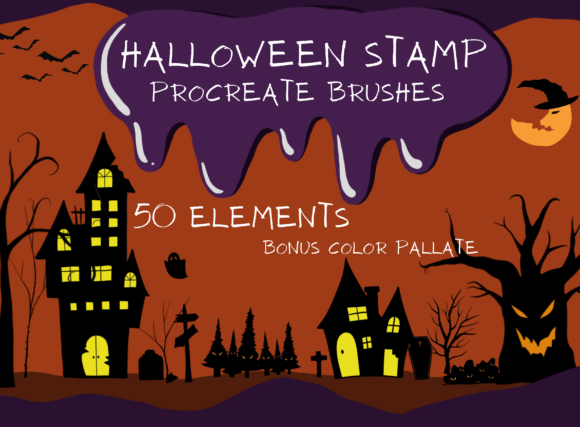
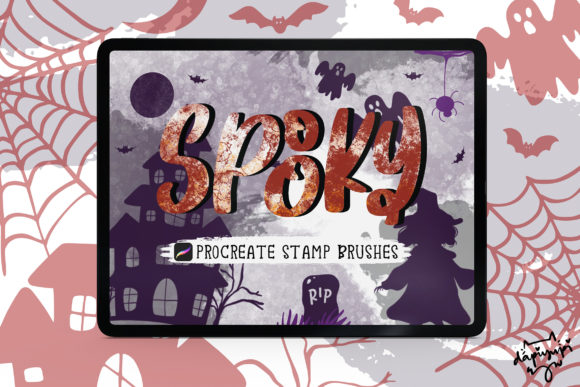
The specific collection discussed here features 70 Halloween-themed stamps. These include a wide variety of spooky and creepy elements such as ghosts, pumpkins, bats, skeletons, witches’ hats, and eerie foliage. Because they are designed specifically for the Procreate app, they leverage the software’s powerful engine to provide high-resolution, scalable graphics that maintain clarity regardless of size.
It is crucial to understand the technical requirements before diving in. These brushes are exclusive to the Apple ecosystem. Specifically, you need an iPad or iPad Pro with the Procreate app installed. The required version is Procreate 5.0 or higher. A common misconception among beginners is that these files might work in other software like Adobe Photoshop or Clip Studio Paint. However, these brushes DO NOT work in Photoshop or other applications. They are delivered as a .brushset file, a format native only to Procreate. This exclusivity ensures that the brushes are optimized for the touch interface and pressure sensitivity of the iPad, providing a seamless user experience.
The Purpose and Significance in Digital Art
Why should an artist choose stamp brushes over drawing every element by hand? The answer lies in efficiency and consistency. In the fast-paced world of digital content creation, time is a valuable resource. Drawing intricate details like spiderwebs or jack-o'-lantern faces from scratch can be time-consuming, especially when you need to produce multiple variations for a campaign or event.
These 70 Halloween stamps help you make things easier, quicker, and more fun. By selecting a brush and tapping the screen, you instantly place a complex design. This allows you to focus on composition, color theory, and overall layout rather than getting bogged down in repetitive detailing. For small business owners creating Halloween promotions, educators preparing seasonal classroom materials, or parents making custom party invitations, this speed is invaluable.
Furthermore, stamp brushes promote creative experimentation. When the barrier to entry for adding complex elements is lowered, artists are more likely to try new combinations. You might not have drawn a vampire bat today, but with a stamp brush, you can easily incorporate one into your scene to see how it affects the mood. This iterative process is essential for developing a unique artistic style.
Practical Applications and Examples
The versatility of these Halloween stamp brushes extends far beyond simple illustrations. Here are several practical ways to utilize them in your daily creative activities:
- Digital Invitations and Greetings: Create custom Halloween party invites. Use pumpkin stamps for borders and ghost stamps for playful accents. The ability to resize and recolor means you can match the stamps to any color scheme.
- Social Media Graphics: Enhance Instagram stories or Pinterest pins with spooky overlays. A subtle bat silhouette or a witch’s hat can add thematic relevance to your posts without overwhelming the main message.
- Scrapbooking and Journaling: If you use Procreate for digital planning, these stamps can decorate your October spreads. Add creepy vines to page corners or use skull icons to mark important dates.
- Educational Materials: Teachers can use these brushes to create engaging worksheets or presentation slides for Halloween-themed lessons, making learning more visually appealing for students.
- Product Design: Designers can incorporate these elements into t-shirt prints, sticker sheets, or packaging designs. Since the stamps are high-quality, they scale well for print-on-demand services.
How to Use These Brushes Effectively
Using these brushes is straightforward, but mastering them requires a bit of practice. Here is a step-by-step approach to getting the most out of your 70 Halloween stamps:
- Installation: After purchase, you will receive one .brushset file. Tap on this file on your iPad, and it will automatically import into Procreate. Ensure your app is updated to version 5.0 or higher to avoid compatibility issues.
- Selection: Open the Brush Library in Procreate and locate your new Halloween set. Browse through the 70 options to find the perfect element for your current project.
- Customization: One of the greatest advantages of digital stamps is flexibility. You can change the color of any stamp instantly. Want a blue ghost instead of a white one? Simply select your desired color from the palette before stamping. You can also adjust the opacity to create translucent, ghostly effects or layer stamps for depth.
- Resizing: Use the transform tool to resize the stamp to best fit your art. Because these are vector-based or high-resolution raster images, they remain crisp even when enlarged significantly.
- Stamping: Tap anywhere on the canvas to place the image. You can stamp multiple times to create patterns or scatter elements naturally across your background.
Common Misunderstandings and Clarifications
As with any digital tool, there are common assumptions that can lead to frustration if not addressed. First, as mentioned earlier, the platform limitation is strict. If you are an Android user or rely solely on desktop software like Photoshop, these brushes will not work. It is essential to verify your hardware and software compatibility before purchasing.
Another misunderstanding is that stamp brushes limit creativity. Some artists worry that using pre-made elements makes their work "less original." However, professional designers frequently use assets like fonts, stock photos, and brushes. The creativity lies in how you combine, modify, and contextualize these elements. By changing colors, rotating angles, adjusting opacity, and blending modes, you can create entirely unique compositions that reflect your personal vision.
Additionally, users sometimes expect these brushes to animate automatically. While Procreate has animation features, these stamp brushes are static images. Any movement or animation must be created manually by the artist using Procreate’s animation assist tools.
Integrating Halloween Brushes into Modern Creativity
In today’s digital landscape, visual content is king. Whether for personal expression or professional branding, the ability to produce high-quality, themed graphics quickly is a valuable skill. Halloween Procreate stamp bridges the gap between amateur doodling and professional design. They allow individuals with varying skill levels to participate in the seasonal creative frenzy.
For businesses, leveraging these tools can enhance marketing efforts during the lucrative Halloween season. Custom graphics stand out more than generic templates, helping brands connect with their audience on a personal level. For educators and parents, these brushes provide a safe and easy way to engage children in digital art, fostering creativity and technical skills simultaneously.
Ultimately, these 70 Halloween stamp brushes are more than just a collection of images; they are a catalyst for creativity. They remove technical barriers, allowing you to focus on the joy of creation. By understanding their capabilities and limitations, you can harness their power to produce spooky, stunning, and memorable art.
If you are ready to transform your digital canvas this Halloween, ensure your iPad is charged, your Procreate app is updated, and let your imagination run wild with these versatile stamp brushes. Happy creating!