Mastering Digital Texture: A Guide to Feathers Procreate Stamp Brushes for iPad Artists
In the rapidly evolving world of digital illustration, texture is often the secret ingredient that transforms a flat design into a tactile, engaging piece of art. For artists working on the iPad, Procreate has become the industry standard, offering a robust suite of tools that mimic traditional media while unlocking infinite digital possibilities. Among the most versatile tools in an artist’s arsenal are stamp brushes. Specifically, the Feathers Procreate Stamp Brushes offer a unique way to incorporate organic, hand-drawn elements into your workflow. This article explores how these specialized brushes can elevate your creative projects, from social media graphics to professional branding, while clarifying the technical requirements needed to use them effectively.
Understanding the Power of Stamp Brushes in Digital Art
Before diving into the specific features of the Feathers collection, it is essential to understand what a stamp brush is and why it matters. Unlike standard drawing brushes that create continuous lines based on the pressure and speed of your stylus, a stamp brush places a pre-defined image or texture onto your canvas with a single tap. Think of it as a digital rubber stamp. However, unlike physical stamps, digital versions offer unparalleled flexibility. You can instantly change the color, size, and opacity of each stamp, allowing for endless variations without the mess of ink or paint.
The significance of using high-quality stamp brushes lies in efficiency and consistency. For professional designers and hobbyists alike, drawing complex textures like feathers, foliage, or intricate patterns from scratch every time is time-consuming. Stamp brushes allow you to build complex compositions quickly. By using the Feathers Procreate Stamp Brushes, you are not just saving time; you are adding a layer of artistic authenticity. Because these brushes are digitally hand-drawn, they retain the imperfections and organic flow of human artistry, avoiding the sterile, repetitive look often associated with computer-generated clipart.
Why Hand-Drawn Elements Matter in Modern Design
In an era where AI-generated images and vector graphics are ubiquitous, there is a growing appreciation for the "human touch" in design. Consumers and clients are increasingly drawn to branding and artwork that feels personal and authentic. Hand-drawn elements convey warmth and approachability. When you use a set of brushes that were crafted by an artist rather than generated by an algorithm, you infuse your work with that same sense of care and intention. This is particularly relevant in fields like branding and invitation design, where the emotional connection with the audience is paramount.
Technical Requirements: Ensuring Compatibility
To get the most out of any digital tool, understanding its technical constraints is crucial. The Feathers Procreate Stamp Brushes are designed with specific hardware and software in mind. It is important to note that these brushes are suitable only for Procreate 5X on iPad. This specificity ensures that the brushes leverage the latest rendering engines and brush dynamics available in the app, providing a smooth and responsive user experience.
Furthermore, the precision required to place and manipulate these stamps effectively necessitates the use of an Apple Pencil. While Procreate supports touch input, the Apple Pencil offers the pressure sensitivity and tilt recognition that serious digital artists rely on. This combination of hardware and software allows for nuanced control over how the stamps interact with your canvas. For instance, you might use lighter pressure to place a faint, background feather, and heavier pressure for a bold, foreground element.
A common misunderstanding among new digital artists is the cross-compatibility of brush files. It is vital to clarify that these brushes are not suitable for Photoshop or Illustrator. Procreate uses a proprietary brush file format (.brushset) that is distinct from Adobe’s .abr (Photoshop) or vector-based tools in Illustrator. Attempting to load these files into other software will result in errors. This limitation is not a drawback but rather a testament to the optimization of the brushes for the Procreate environment. If you are working in a multi-software workflow, you can always export your finished Procreate artwork as a PNG or PSD file to continue editing in other programs, but the brushes themselves must remain within the Procreate ecosystem.
Practical Applications for the Feathers Brush Set
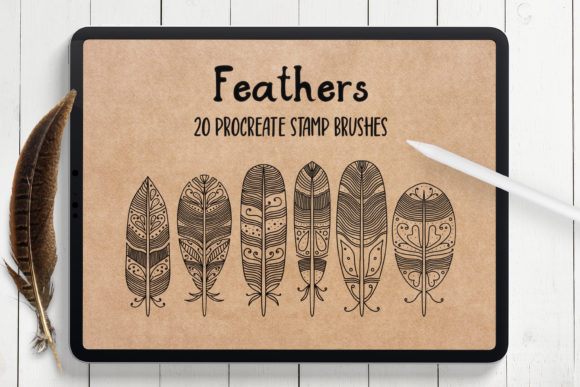
The versatility of the Feathers Procreate Stamp Brushes makes them applicable to a wide range of creative projects. This set includes 20 hand-drawn stamp brushes, providing a diverse library of shapes and textures. Here is how you can integrate them into your daily creative practice:
- Sticker Design: Stickers thrive on cute, distinct shapes. Use the feather stamps to create whimsical characters or decorative elements that can be cut out and sold as digital or physical stickers.
- Invitations and Cards: Wedding invitations, birthday cards, and holiday greetings benefit from elegant, organic borders. Arrange the feather stamps to create decorative frames that surround your text, adding a touch of sophistication.
- Logo and Branding: For brands focused on nature, wellness, or artisanal products, feather motifs can symbolize lightness, freedom, and creativity. Use the stamps to construct unique logo icons or brand patterns.
- Social Media Design: In the fast-paced world of Instagram and Pinterest, eye-catching graphics are essential. Use the brushes to create quick backgrounds or accent pieces for quotes and promotional posts.
- Artworks and Illustrations: Incorporate the feathers directly into larger illustrations. They can serve as part of a character’s costume, a background texture, or a focal point in a nature-themed piece.
Creating Beautiful Arrangements and Backgrounds
One of the most powerful features of these stamp brushes is the ability to change color, size, and opacity. This flexibility allows you to create depth and dimension. For example, to create a dreamy background, you might scatter large, low-opacity feather stamps in soft pastel colors across the canvas. Then, overlay smaller, higher-opacity stamps in contrasting colors to create focal points. This layering technique mimics the way light interacts with physical objects, giving your digital art a sense of volume and space.
Designing unique greeting cards becomes an intuitive process when you have a library of cohesive elements. Instead of searching for disparate clipart images that may not match in style, you have a unified set of 20 brushes that all share the same hand-drawn aesthetic. This consistency ensures that your final design looks professional and polished.
How to Get Started with Your Brush Set
Acquiring and installing these tools is straightforward. When you purchase the Feathers Procreate Stamp Brushes, you will receive one .brushset file contained within a ZIP file. To install them, simply unzip the file on your iPad and tap the .brushset file. It will automatically open in Procreate and add the 20 brushes to your library. From there, you can organize them into a dedicated folder for easy access.
As you begin experimenting, remember that digital art is non-destructive. Feel free to make mistakes, undo actions, and try different combinations. The goal is to explore the potential of these tools. Try rotating the stamps, mirroring them, or blending them with other Procreate brushes to create hybrid textures. The more you experiment, the more you will discover unique ways to incorporate these feathers into your artistic vocabulary.
Conclusion
The Feathers Procreate Stamp Brushes represent more than just a set of digital tools; they are a gateway to more efficient, expressive, and professional-looking digital art. By understanding their specific requirements—Procreate 5X on iPad and an Apple Pencil—and leveraging their hand-drawn quality, artists can enhance a wide variety of projects. Whether you are designing a logo, creating a social media post, or illustrating a complex artwork, these brushes provide the organic texture and versatility needed to stand out in a digital world. Embrace the convenience of stamp brushes and let your creativity take flight.