Procreate Stamp Brushes Winter Botanical: A Practical Guide for Digital Designers
In the evolving landscape of digital illustration and graphic design, efficiency often dictates the quality of output. For professionals working on tight deadlines, from social media managers to independent publishers, the ability to produce high-quality visual assets quickly is paramount. This is where specialized toolsets like the Procreate Stamp Brushes Winter Botanical collection become essential components of a modern creative workflow. Rather than serving merely as decorative elements, these brushes function as modular building blocks that streamline the design process, allowing creators to focus on composition and narrative rather than repetitive line work.
Understanding how to integrate this specific brush set into your existing pipeline requires a shift in perspective. It is not just about adding a plant to a canvas; it is about leveraging pre-designed, hand-drawn assets to maintain consistency across projects while significantly reducing production time. Whether you are designing holiday greeting cards, packaging labels, or editorial illustrations, knowing how to manipulate and combine these elements effectively can transform your output.
Understanding the Asset Structure
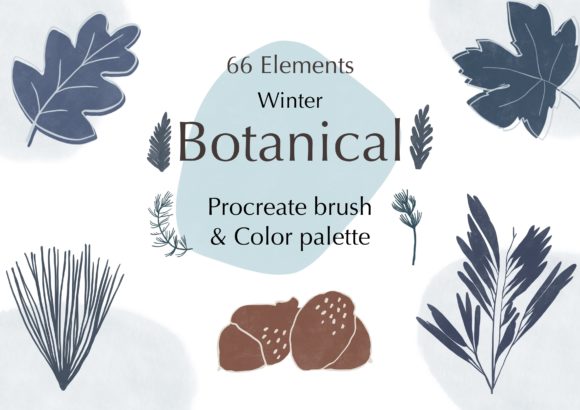
Before diving into application, it is crucial to understand what is included in the package and how each component serves a different function within the design hierarchy. The collection is divided into four distinct categories, each addressing a specific need in the illustration process.
- 36 Winter Botanical Brush-set Line: These are outline-based stamps ideal for coloring books, minimalist designs, or layers that require user-defined color fills. They provide the structural skeleton of your botanical elements.
- 36 Winter Botanical Brush-set Shape: These are filled shapes that offer immediate visual weight. They are perfect for quick compositions where solid forms are needed without the extra step of filling lines.
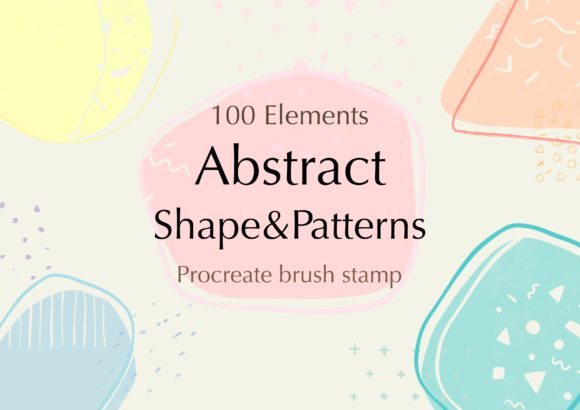
- 30 Abstract Shape Brush-set: This component adds versatility, allowing for background textures, organic blobs, or modern geometric accents that complement the botanical themes without being literal representations of plants.
- Dark Blue 30 Color Palettes: Curated specifically to match the winter aesthetic, these palettes remove the guesswork from color theory, ensuring that your final piece has a cohesive and professional look.
By categorizing the assets this way, the creator of the brush set has anticipated the various stages of digital painting. You might start with the abstract shapes for layout blocking, move to the botanical lines for detail, and use the shape brushes for rapid prototyping before finalizing colors using the provided palettes.
Technical Compatibility and Setup
A common friction point in adopting new digital tools is compatibility. It is important to note that this brush set is engineered exclusively for the Procreate ecosystem. It does not function in Adobe Photoshop, Clip Studio Paint, or any other raster graphics editor. This limitation is due to the proprietary file structure Procreate uses for its brush engines, which allows for advanced features like pressure sensitivity and tilt recognition.
To utilize these brushes effectively, your hardware setup must meet specific criteria. You will need an iPad Pro or a compatible iPad model that supports the Apple Pencil or a comparable pressure-sensitive stylus. The pressure sensitivity is not just a luxury; it is integral to the user experience. While stamp brushes are generally static images, the ability to adjust size and opacity on the fly using the stylus pressure or slider controls allows for dynamic placement. Without a pressure-sensitive input device, you lose the nuanced control required to blend these stamps seamlessly into a larger composition.
Installation is straightforward but requires attention to detail. Once imported into Procreate, it is advisable to organize these brushes into a dedicated group within your brush library. This prevents clutter and ensures that when you are in the flow of creation, you are not searching through unrelated tools. Proper organization at the setup stage pays dividends in efficiency during the execution phase.
Integrating Stamps into Your Design Workflow
The true value of the Mix and match Brush-set Hand-drawn Botanical Plant, Vase and Abstract shape Brush-set lies in its integration into broader design tasks. Here is how you can position these tools within different phases of a project.
Pre-Production and Concepting
In the early stages of a project, speed is essential. Instead of sketching every leaf and branch from scratch, use the abstract shape brushes to block out the general composition. This helps in determining balance and negative space. You can rapidly iterate on layouts by swapping out different botanical stamps to see which arrangement feels most harmonious. This "rapid prototyping" approach allows you to present multiple concepts to clients or stakeholders without investing hours in detailed rendering.
Execution and Layer Management
During the main creation phase, layer management becomes critical. Because these are stamp brushes, each tap creates a new instance of the image on your current layer. For maximum flexibility, consider placing each major element on its own layer or grouping related elements. This allows you to adjust the position, scale, and opacity of individual plants without affecting the rest of the design.
One practical tip is to utilize the "Multiply" or "Overlay" blend modes when working with the line art brushes. This can help integrate the black lines more naturally with colored backgrounds, giving the impression that the drawing belongs to the scene rather than sitting on top of it. Similarly, adjusting the opacity of the shape brushes can create depth, making some elements recede into the background while others pop forward.
Post-Production and Consistency
After the main elements are placed, the included Dark Blue color palettes come into play. Consistency in color grading is what separates amateur designs from professional ones. By restricting your palette to the provided swatches, you ensure that every element shares a common tonal language. If you need to introduce accent colors, use the color picker to sample from the existing botanical elements, maintaining harmony.
Quality control at this stage involves checking for repetition. Since these are stamps, there is a risk of the design looking too "copy-pasted." To mitigate this, vary the size and rotation of each stamp. Flip elements horizontally or vertically to create mirror images. Combine the line art with the shape fills—perhaps using a line art leaf over a slightly offset shape fill—to create a unique, hand-drawn texture that disguises the digital origin of the asset.
Practical Use Cases for Entrepreneurs and Creators
The versatility of this brush set makes it suitable for a wide range of applications beyond simple illustration. For small business owners, these assets can be used to create branded social media content quickly. A consistent botanical theme can become part of your brand identity, recognizable to your audience across Instagram posts, stories, and Pinterest pins.
Educators and bloggers can use these brushes to create engaging headers and dividers for articles or lesson plans. The winter botanical theme is particularly relevant for seasonal content, holiday newsletters, and end-of-year reviews. By having a library of pre-made, high-quality elements, you can produce visually appealing graphics in minutes rather than hours, freeing up time for writing and strategy.
For freelancers and agencies, this toolset offers a way to scale production. When handling multiple client projects with similar aesthetic requirements, having a reliable set of botanical stamps ensures that you can deliver consistent quality without burning out on repetitive drawing tasks. It allows you to charge for the value of the design and the strategy behind it, rather than just the hours spent drawing individual leaves.
Maximizing Long-Term Value
To get the most out of your purchase, treat these brushes as a foundational asset library. Over time, you can modify the brushes themselves within Procreate. You can adjust the source image, change the default behavior, or even combine multiple stamps into new custom brushes. This level of customization ensures that the tool grows with your skills.
Furthermore, consider how these digital assets interact with physical products. If you are a publisher or print-on-demand seller, the high resolution of these stamps ensures they look crisp on printed materials like mugs, tote bags, and greeting cards. Always check your document DPI settings (typically 300 DPI for print) before starting your project to ensure the final output meets professional printing standards.
In conclusion, the Procreate Stamp Brushes Winter Botanical collection is more than a set of pretty pictures; it is a productivity tool designed for the modern digital creator. By understanding its structure, respecting its technical requirements, and integrating it thoughtfully into your workflow, you can enhance both the speed and quality of your design projects. Whether you are a seasoned professional or a hobbyist looking to elevate your craft, these brushes offer a practical path to more efficient and visually compelling creations.