Unlocking Creative Flow with Noodlefy Procreate Multi Line Brushes
In the rapidly evolving landscape of digital illustration, the tools we choose often dictate the fluidity of our creative expression. For artists using iPad-based workflows, finding brushes that bridge the gap between technical precision and organic hand-drawn charm is a perpetual quest. Enter the Noodlefy Procreate Multi Line Brushes, a specialized toolset designed to streamline the process of adding decoration, color, texture, and patterns to digital artwork. This article explores how these brushes function, who benefits from them, and how they can transform a standard digital canvas into a vibrant tapestry of unique designs.
The Essence of Multi-Line Technology in Digital Art
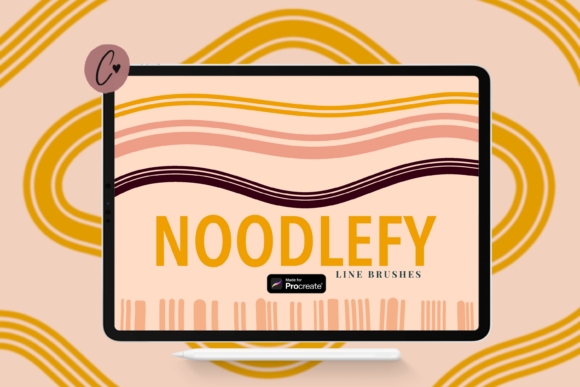
Traditional digital brushing often involves laying down single strokes, requiring artists to manually duplicate lines or use complex layer effects to create patterned textures. The Noodlefy Line Brushes for Procreate disrupt this conventional workflow by introducing multi-line functionality directly into the brush engine. When you draw a single stroke, the brush automatically generates multiple parallel lines, varying in spacing and weight depending on the specific brush selected from the set.
This capability is not merely a novelty; it is a significant time-saver for creators who rely on hatching, cross-hatching, or decorative borders. By automating the repetition of lines, artists can focus more on composition and less on the mechanical aspect of drawing identical strokes. The result is a more natural, hand-crafted aesthetic that retains the warmth of traditional media while leveraging the efficiency of digital tools.
Key Features and Technical Specifications
Understanding the architecture of the Noodlefy Procreate Multi Line Brushes helps users maximize their potential. The package is delivered in a .brushset format, which is specifically engineered for seamless integration with Procreate. Here is a breakdown of what users receive and how these features contribute to a smoother creative experience:
- Eight Distinct Brushes: The set includes eight unique line variations, each offering different textures and spacing dynamics. This variety ensures that artists are not limited to a single look, allowing for diverse applications within a single project.
- Full Customizability: Users can easily recolor, change size, and adjust opacity. This flexibility means the brushes can adapt to both bold, graphic styles and subtle, background textures.
- Combinatorial Potential: The brushes are designed to work harmoniously together. Combining different line weights and patterns can create complex, beautiful art pieces that appear intricate but are quick to produce.
- Streamlined Installation: The neatly labeled Procreate file allows for quick import of all brushes in one go, eliminating the tedious process of installing individual brush files.
- Compatibility Requirements: It is important to note that this brush set requires Procreate version 5 or later. This ensures access to the latest brush engine improvements that support multi-line rendering effectively.
Practical Applications for Diverse Creators
The versatility of the Noodlefy Line Brushes for Procreate makes them suitable for a wide range of artistic disciplines. While they are powerful enough for professional illustrators, their ease of use also appeals to hobbyists and business owners looking to create unique visual assets.
Illustration and Character Design
For character designers, texture is key to defining material and depth. Using these multi-line brushes, an artist can quickly shade clothing folds, create hair textures, or add decorative patterns to costumes without spending hours on manual detailing. The ability to adjust opacity allows for soft shading effects that blend seamlessly with base colors.
Graphic Design and Branding
Business owners and graphic designers often need unique patterns for packaging, social media backgrounds, or website elements. The Noodlefy Procreate Multi Line Brushes enable the rapid creation of custom patterns. By experimenting with different brush combinations, designers can generate proprietary textures that enhance brand identity without relying on stock assets.
Journaling and Scrapbooking
Digital journaling has surged in popularity, and users constantly seek ways to decorate their pages. These brushes are ideal for creating borders, dividers, and decorative accents. The "noodle" effect—where lines twist and turn organically—adds a playful, handwritten feel that enhances the personal touch of digital planners and scrapbooks.
Evaluating Suitability: Is This Set Right for You?
While the features are compelling, it is essential to evaluate whether this tool aligns with your specific workflow. Consider the following factors when determining if the Noodlefy Line Brushes for Procreate are a good fit for your needs:
- Workflow Speed: If you frequently find yourself repeating line patterns or struggling with consistent hatching, this set will significantly accelerate your process. However, if your style relies heavily on photorealistic rendering or single-line ink work, the utility may be limited.
- Software Version: Ensure you are running Procreate version 5 or higher. Older versions may not support the
.brushsetformat or the advanced brush behaviors utilized in this pack. - Desired Aesthetic: These brushes excel at creating stylized, textured, and decorative looks. If your goal is clean, vector-like precision, you may need to adjust your expectations or use these brushes in combination with stabilization tools.
Strengths and Considerations
One of the primary strengths of the Noodlefy Procreate Multi Line Brushes is their user-friendly nature. The neatly labeled files and one-click import process reduce the technical barrier to entry, allowing artists to start creating immediately. Furthermore, the ability to recolor and resize brushes on the fly encourages experimentation, fostering a play-driven approach to art creation.
However, users should be aware of certain limitations. As with any specialized brush set, overuse can lead to a repetitive visual style if not varied with other tools. It is advisable to combine these line brushes with standard textured brushes and blending modes to maintain visual interest. Additionally, while the brushes are optimized for performance, complex multi-line strokes on very large canvases may require a newer iPad model to ensure smooth latency-free drawing.
Real-World Scenarios: Bringing Designs to Life
To illustrate the practical value of these tools, consider a scenario where a freelance illustrator is commissioned to create a series of botanical prints. Traditionally, drawing the veins of leaves and the texture of stems would require meticulous, time-consuming line work. With the Noodlefy Line Brushes for Procreate, the artist can select a fine multi-line brush to sketch the leaf structure in seconds. By adjusting the opacity, they can layer additional strokes to create depth and shadow, achieving a rich, textured look in a fraction of the time.
Another example involves a small business owner creating packaging for handmade soaps. They need a unique, organic pattern for the box design. Using the Noodlefy Procreate Multi Line Brushes, they can experiment with various line densities and colors to create a custom wave pattern that reflects the natural ingredients of their product. This level of customization helps differentiate their brand in a crowded market, all achieved through intuitive digital tools.
Conclusion: Enhancing Your Digital Toolkit
The Noodlefy Procreate Multi Line Brushes represent a thoughtful addition to any digital artist's toolkit. By simplifying the creation of complex line patterns and textures, they empower creators to focus on the artistic vision rather than the mechanical execution. Whether you are a professional illustrator seeking efficiency, a designer looking for unique patterns, or a hobbyist eager to decorate your digital journals, this brush set offers tangible value.
As with any creative tool, the true potential lies in exploration. We encourage users to experiment with combining brushes, adjusting settings, and integrating these lines into broader compositions. By doing so, you can unlock new dimensions in your digital art, creating unique designs that are both visually striking and personally meaningful. For those ready to elevate their Procreate experience, the Noodlefy Line Brushes for Procreate provide a reliable, versatile, and inspiring pathway to enhanced creativity.
Note: Always ensure your software is up to date to fully utilize the features of modern brush sets. Happy creating!