Wet Brushes Strokes: Procreate Guide
Digital art often struggles to capture the raw, unpredictable energy of traditional media. We spend hours refining lines and smoothing gradients, only to miss the organic texture that comes from a real bristle dragging across paper. This is where Wet Brushes Strokes changes the workflow. It is not just another pack of digital tools; it is a bridge between the tactile satisfaction of physical painting and the efficiency of modern design software. For creators who value authenticity in their visual communication, this set offers a way to inject soul into pixels.
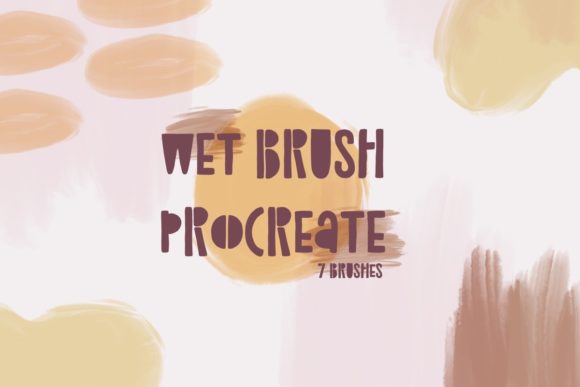
The core appeal lies in its simplicity and impact. This set includes seven handmade brushstrokes designed specifically for Procreate on iOS and iPadOS. These are not complex, multi-layered brushes that require extensive tweaking. They are ready-to-use assets that deliver an authentic, awesome look immediately upon application. Whether you are designing social media graphics, crafting digital invitations, or adding texture to a marketing campaign, these strokes provide the human touch that algorithms and vector shapes often lack.
Bridging the Gap Between Digital and Traditional
Many designers hesitate to go fully digital because they fear their work will look sterile. Conversely, traditional artists sometimes find the learning curve of digital tablets steep. Wet Brushes Strokes addresses this by mimicking the behavior of wet media—think watercolors, inks, or heavy body acrylics—without the mess. The "wet" aspect refers to the fluidity and blending characteristics embedded in the brush engine. When you apply a stroke, it behaves as if the pigment is still fresh, allowing for natural overlaps and subtle transparency variations.
This realism is crucial for building trust with your audience. In an era where consumers are bombarded with polished, AI-generated imagery, handmade elements signal effort and intentionality. Using these brushstrokes tells your viewers that a human hand guided the creation process. It adds a layer of credibility and warmth that is particularly effective for brands focusing on wellness, craftsmanship, education, or lifestyle sectors.
Practical Applications for Diverse Creators
The versatility of this seven-piece set means it can adapt to various professional needs. Here is how different users can leverage these tools to enhance their projects:
- Social Media Managers: Stop relying on generic stock photos. Use the brushstrokes to create unique backgrounds for Instagram stories or Pinterest pins. A single, bold stroke behind a text overlay can turn a simple quote into a branded asset.
- Small Business Owners: Elevate your packaging design or thank-you cards. Adding a subtle watercolor wash or an ink splatter can make your physical products feel more artisanal and premium.
- Educators and Coaches: When creating presentation slides or workbook covers, use these strokes to highlight key concepts. The organic shape draws the eye without the rigidity of standard geometric highlights.
- Freelance Designers: Speed up your client work. Instead of spending hours painting custom textures from scratch, drop in a pre-made stroke, adjust the color to match the brand palette, and move on. It maintains quality while improving billable efficiency.
Mastering the Seven Handmade Strokes
Understanding the specific character of each of the seven included strokes is key to maximizing their potential. While they share the same "wet" DNA, each one offers a different weight, spread, and texture. Some may be broad and sweeping, ideal for background washes, while others might be sharper and more defined, perfect for accent marks or underlining headlines.
To get the most out of these Procreate brushstrokes, experiment with opacity and flow settings. Lowering the opacity can create delicate, ethereal layers that build depth over time. Increasing the flow can give you those bold, confident marks that define modern graphic design trends. Do not be afraid to rotate the canvas or flip the stroke horizontally. Since these are handmade, slight variations in angle can make the same brush feel entirely new.
Color Theory and Texture Integration
The true magic happens when you combine these strokes with thoughtful color choices. Wet media looks best when colors interact. Try placing a cool blue stroke over a warm yellow one to see how the digital "pigment" blends. This interaction creates secondary colors and gradients that feel natural rather than computed.
For a sophisticated look, stick to a limited palette. Choose two or three complementary colors and apply the strokes in varying intensities. This approach keeps your design cohesive and prevents the texture from overwhelming the message. Remember, the brushstroke is a supporting actor, not the lead. It should enhance readability and visual interest, not distract from the core content.
Workflow Tips for Consistency and Organization
Integrating new tools into your existing workflow requires a bit of organization. Since these files come in the .brushset format, importing them into Procreate is straightforward. Once installed, create a dedicated folder in your brush library. This ensures you can access your wet brushes quickly without scrolling through hundreds of default options.
Consistency is vital for branding. If you use Wet Brushes Strokes for a client project, save the specific color codes and brush settings you used. This allows you to replicate the look across multiple deliverables, such as business cards, websites, and social posts. Documenting your process also helps if you need to hand off files to other team members or if you revisit the project months later.
Furthermore, consider the resolution of your canvas. While digital brushes are scalable, working at a higher resolution ensures that the edges of your wet strokes remain crisp and detailed, especially if you plan to print the final design. For web-only use, standard screen resolution is sufficient, but always preview your work on actual devices to ensure the texture translates well on smaller screens.
Elevating Your Creative Identity
In a crowded digital landscape, standing out requires more than just good ideas; it requires a distinct visual voice. Wet Brushes Strokes provides the tools to cultivate that voice. By incorporating handmade elements into your digital work, you signal a commitment to quality and authenticity. You move away from the cookie-cutter templates that dominate online spaces and toward a style that is uniquely yours.
Whether you are a seasoned illustrator looking to speed up your texturing process or a marketer wanting to add a human touch to your campaigns, this set offers a practical solution. It removes the technical barriers to achieving a traditional look, allowing you to focus on creativity and strategy. The result is work that feels alive, engaging, and genuinely connected to the viewer.
Start experimenting with these seven strokes today. Test them on your next project, observe how they interact with your preferred colors, and notice the difference they make in the overall feel of your design. The goal is not perfection, but expression. Let the wet brushes guide your hand, and let your creativity flow with the same freedom as paint on paper.